Claude Code Conversion & Revenue Optimization Toolkit
Find where a website loses conversions, rank what to fix, and prove the fix worked — with Claude Code. 70 workflows, 68 commands, one download.
One payment. Instant download. Licensed to one person for unlimited projects, including client work.
Who this is for
Developers, founders and agencies who own a website that gets traffic and does not turn enough of it into revenue. It assumes you can read a diff, run a command and reach your live site. It does not assume you are a CRO specialist — most of it is aimed at the competent generalist who has inherited responsibility for a number that is not moving.
If nobody is arriving yet, this is the wrong product. Fix distribution first with the SEO & Website Audit Toolkit, or build the site with the Website Launch System. This one is for traffic that already exists.
What it is for
Ask a capable model to “increase conversions” and a fair share of what comes back is a countdown timer, a fake stock warning, and a confident prediction that the change will lift revenue by some percentage. None of that is knowledge. Two thirds of it is a compliance risk.
The other failure mode is quieter and more expensive: an audit that finds problems and fixes them in the same session, leaving a diff across thirty files, no report, and no way to tell which finding was real. Or a funnel analysis built on a purchase event that fires twice, so every number in it is wrong in the same direction and nothing about the output looks unusual.
Every workflow here is written against those three failures. Findings carry evidence and an honesty label. Audits change nothing. Tracking is verified in both directions before any number is trusted. And no workflow will tell you a change will produce a percentage lift, because nobody can know that in advance.
What is included
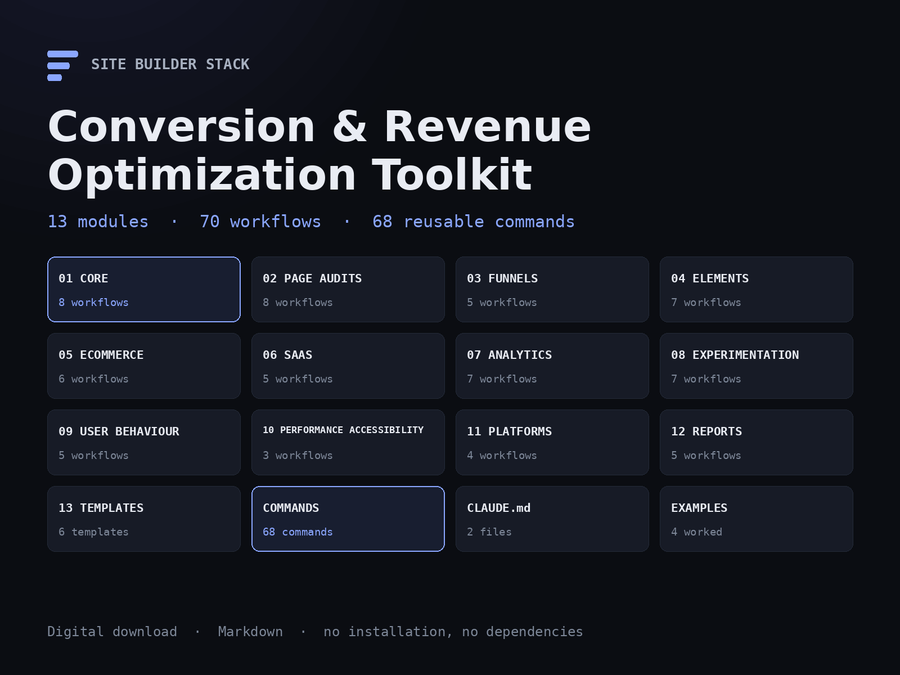
Thirteen modules, 70 workflows, 68 commands, six templates and four worked examples — 65,000 words of plain Markdown. Nothing to install, no account, no subscription.
| Module | Covers |
|---|---|
01-core |
The master audit, the four modes, the finding format, prioritisation, evidence standards, the prohibitions |
02-page-audits |
Homepage, landing, pricing, product, category, checkout, signup, content |
03-funnels |
Funnel mapping, drop-off diagnosis, micro-conversions, traffic source fit, lead generation |
04-elements |
CTAs, forms, navigation, pricing presentation, trust, objections, conversion copy |
05-ecommerce |
The Shopify audit in depth, product detail, cart abandonment, checkout, merchandising, post-purchase |
06-saas |
The SaaS funnel, onboarding and activation, trial to paid, packaging, demo flows |
07-analytics |
Analytics audit, measurement plans, GA4, privacy-first tooling, event QA, attribution |
08-experimentation |
Hypotheses, sample size, design, reading results, the log — and when not to test |
09-user-behaviour |
Usability review, session recordings, surveys, voice of customer, choosing a method |
10-performance-accessibility |
Performance and conversion, accessibility barriers on the conversion path, mobile |
11-platforms |
WordPress and WooCommerce, no-code builders, JavaScript frameworks, what is fixable where |
12-reports |
Executive summary, full report, quick wins, experiment report, client delivery |
13-templates |
30/60/90 roadmap, finding log, experiment backlog, measurement plan, copy brief, hypothesis |
Plus commands/ with 68 ready commands in nine categories, claude-md/ with the section that makes the conventions automatic, and examples/ with four complete runs.
The method
Measure → Diagnose → Prioritise → Change → Validate → Learn. Each step exists because skipping it produces a specific failure, and the toolkit names them: skip measurement and you get opinions about a site nobody has data on; skip prioritisation and you get forty findings and no idea which one to do; skip validation and you get a change nobody confirmed worked.
Underneath that sit four modes, which is the convention that makes the rest work.
| Mode | What it does |
|---|---|
| AUDIT | Analyse. Change nothing. Most workflows are this. |
| PLAN | Turn findings into sequenced, estimated work. Still no changes. |
| IMPLEMENT | Make one specific, named, approved change. Nothing else. |
| VALIDATE | Check the change did what was predicted. |
Never let one session both find and fix. Every workflow declares its mode in its first line.
What a finding looks like
Every finding uses the same thirteen-field format, and the field that matters most is the one naming its evidence class.
| Label | Means | What to do |
|---|---|---|
| Proven problem | Something is broken and you can reproduce it | Fix it. No test needed. |
| Strong heuristic | An established mechanism, observed here — not proof for this site | Usually ship it, knowing what you know. |
| Experiment opportunity | Plausible, unproven, reasonable people would disagree | Test it, if you have the traffic. |
| Insufficient data | You cannot tell yet, usually because measurement is missing | Instrument it first. |
Findings are scored Impact × Confidence ÷ Effort and banded into this week, this month, next quarter, and do not do. That last band is the one most reports never produce and it saves the most time.
The Shopify module
A generic audit sees a slow product page. This one reads the theme: it finds the four apps injecting scripts through content_for_header, the image_url call with no width serving a 2,400px hero to a 390px screen, the loading="lazy" that Dawn-derived themes apply to the first image in a loop, the checkout settings requiring a company name nobody uses, and the app pixel firing a second purchase event alongside the native one.
It also states what each fix requires — a theme change, an app change, a settings change, or a plan upgrade — because a recommendation a merchant cannot act on is noise.
What it will not do
It will not predict a percentage lift. Not once, anywhere. The honest form is: here is the measurement, here is the mechanism, here is the metric to watch and when we will read it. Every workflow says so, and a build-time check refuses to package the product if a prediction has crept into a file.
It will not recommend manipulative tactics. Fake testimonials or reviews, invented customer numbers, countdown timers without a real deadline, stock scarcity that is not tracked, hidden fees, drip pricing, pre-selected paid add-ons, cancellation harder than signup, confirmshaming, deceptive button labels, or tracking without the consent your jurisdiction requires. The list is explicit, and it is repeated in every workflow rather than stated once — because a prohibition at the top of a long session does not survive to the end of it.
It will not tell you to A/B test everything. There is a whole workflow whose job is to tell you not to. Most sites do not have the traffic for a useful experiment, and running an underpowered test is worse than running none: it produces a number, and the number gets quoted.
What using it looks like
- Open
START-HERE.md. It routes you to one file based on your situation. - Open
01-core/MASTER-CRO-AUDIT.md, fill in the bracketed values, hand it to Claude Code. - It runs discovery and stops. You read what it found before it continues.
- It produces findings with evidence — the URL, the element, the device, the viewport, and how many attempts reproduced it.
- You score them, band them, and do the top one in a separate session.
- You validate it, then do the next.
If you only ever use the master audit and the prioritisation framework, the toolkit has done its job.
Platforms
Shopify has a dedicated module that reads the theme source. WooCommerce, Webflow and Squarespace, and JavaScript frameworks each have their own file, because what goes wrong differs and so does what is fixable. Everything else applies anywhere.
How the three products differ
| Conversion & Revenue | SEO & Website Audit | Website Launch System | |
|---|---|---|---|
| Price | $19.99 | $19.99 | $19.99 |
| Best for | Traffic that under-converts | A site that is not ranking | A site you are building |
| Conversion auditing | Primary | Not covered | One landing-page workflow |
| Funnel and drop-off analysis | Complete | Not covered | Not covered |
| Experimentation | Complete | Not covered | Not covered |
| Analytics and measurement | Complete | Search data only | Setup level |
| Ecommerce and SaaS specifics | Complete | Not covered | Build level |
| Conversion copy | Complete | Not covered | Not covered |
| Technical SEO | Not covered | Complete | Included |
| Search Console and Bing | Not covered | Complete | Summary level |
| Content auditing for search | Not covered | Complete | Not covered |
| Accessibility | Conversion path only | SEO overlap only | Complete |
| Performance | Conversion effect only | Core Web Vitals in full | Included |
| Planning and architecture | Not covered | Not covered | Complete |
| Security audits | Not covered | Not covered | Complete |
| Git, CI/CD, deployment | Not covered | Not covered | Complete |
All three are also sold together as the Complete Site Builder Stack, at less than buying them separately. Both figures are shown on that page. There is also a fourth product for the stage after launch: the Website Operations & Maintenance System covers monitoring, security, backups, updates, deploys and incidents, and is sold on its own. If only one column above describes your problem, buy that one — there is no advantage to owning a system you are not going to open.
They are designed to sit end to end: the Launch System builds it, the SEO toolkit gets it found, this one turns the traffic into revenue. Where they overlap, this toolkit defers rather than duplicates — full accessibility auditing is in the Launch System, search performance is in the SEO toolkit, and the workflows here say so where they stop.
Buying one does not include the others, and there is no automatic upgrade credit. If you want more than one, buy more than one.
Delivery and licence
A single ZIP, delivered by download immediately after purchase. 99 files, 213 KB, all plain Markdown — nothing to install and nothing that expires. A published SHA-256 checksum accompanies the download so you can verify what you received.
Licensed to one person for unlimited projects, including client work. You may not redistribute or resell it. Full terms are in LICENSE.md inside the archive.
What is not promised
No conversion rate, no revenue outcome, no percentage. The toolkit is explicit throughout that predicted lifts cannot be made honestly, and that applies to the product itself as much as to the reports you produce with it.
What you get instead is a defensible order of work, findings that carry their evidence, and a way to find out whether each change did anything.
Inside the Conversion & Revenue Optimization Toolkit
No video is published yet. Below is the same walkthrough it will narrate, in a form that works today.
-
What lands in your inbox
One ZIP. Thirteen numbered modules, 70 workflows, 68 commands, six templates and four worked examples, plus a START-HERE that tells you which file to open. All plain Markdown — nothing to install, no account, no subscription.
claude-code-conversion-revenue-optimization-toolkit/ START-HERE.md 01-core/ 02-page-audits/ ... 13-templates/ commands/ claude-md/ examples/ -
START-HERE routes you in five minutes
It does not explain conversion optimisation. It asks what your situation is and sends you to one file. The table is the whole page.
| Your situation | Open this | | I want the full audit | 01-core/MASTER-CRO-AUDIT.md | | I do not know where people drop off| 03-funnels/FUNNEL-MAPPING.md | | I sell on Shopify | 05-ecommerce/SHOPIFY-CRO-AUDIT.md| -
Every workflow declares a mode
AUDIT analyses and changes nothing. PLAN sequences findings. IMPLEMENT makes one named change. VALIDATE confirms it worked. Never letting one session both find and fix is the single convention that makes the rest of the toolkit work.
> **Mode: AUDIT** — this workflow changes nothing. > It produces findings. -
Discovery runs first, then stops
The master audit reports the site's structure, the conversion architecture and what it cannot determine without data you have not given it. Then it waits. You read it before anything else happens.
### Phase 1 — Discovery. Change nothing, then stop. -
Findings carry evidence and an honesty label
Thirteen fields, including the one that matters most: is this a proven problem, a strong heuristic, an experiment opportunity, or insufficient data? A heuristic never becomes proof because it was written confidently.
Evidence: iPhone 13, Safari 17, 390x844. Focusing #card-number raises the keyboard; submit sits at y=812, under it. Reproduced 3/3. Type: proven problem -
Priorities are scored, and some things are marked do-not-do
Impact × Confidence ÷ Effort, each 1–5, banded into this week, this month, next quarter, and do not do. Two rules override the score: critical severity jumps the queue, and measurement comes first.
| Purchase event never fires | 5 | 5 | 1 | 25 | This week | | Hero headline is vague | 3 | 2 | 1 | 6 | Experiment | | Button colour inconsistent | 1 | 2 | 1 | 2 | Do not do | -
Tracking is verified in both directions
An event that fires on the real action is half the check. The other half is proving it does not fire on page load, on a refresh of the confirmation page, on back-navigation, or on a client-side route change. Duplicate purchase events make every downstream number wrong in the same direction.
Positive: complete an order -> exactly 1 Negative: refresh confirmation -> 0 back-navigation -> 0 SPA route change -> 0 -
The experiment workflow that tells you not to
Before designing a test, a gate: is it broken, is it a requirement, would you ship it regardless, and do you have the traffic? For most sites the answer is that testing is impractical — and saying so beats three weeks producing a number nobody should act on.
Under 100 weekly conversions — no useful A/B testing 100–500 — very large effects only, rarely Above 500 — a programme becomes possible -
It refuses the tactics you did not ask for
Fake countdowns, untracked stock warnings, invented customer numbers, hidden fees, pre-selected add-ons, confirmshaming, obstructive cancellation. The prohibition is repeated in every workflow, because a rule stated once at the start of a long session does not survive to the end of it.
Would this still work if the visitor understood
exactly what was happening?
The recorded walkthrough is not published yet. Rather than put a play button over a still image, the steps above are the same tour in writing — the real folder names, the real entry point, and the real conventions the toolkit runs on.
For the method applied to a real site, read how this store was built.
Before you buy
Nobody can promise that and this does not. What it does is find the places a site loses people, rank them by evidence rather than by opinion, and give you a way to tell whether each fix worked. Where the honest conclusion is that a site does not have enough traffic to know, the workflows are written to say so — which is more useful than a number produced to satisfy the question.
The SEO toolkit gets people to arrive. This one works out what happens to them once they do. They share no material: the SEO toolkit has no conversion coverage at all, and this one defers search-performance analysis to it rather than duplicating it.
The Launch System builds and launches a site, and contains one landing-page CRO workflow among its 100 prompts. This is 70 workflows on conversion alone, plus funnels, analytics, experimentation and user research, none of which the Launch System covers. If you are building a site, start there. If you have one that under-converts, start here.
It is considerably more useful with one, and the toolkit is explicit about that. Where you have no measurement, the workflows mark the affected findings insufficient data rather than guessing, and the first recommendation becomes instrumentation. That is the correct order, and there is a full module on setting it up.
Yes, and it is written for that case. Most sites cannot run a useful A/B test, so the toolkit's route is defect-fixing, qualitative research and judgement — with an explicit workflow whose job is to tell you when testing is not viable and what to do instead.
Shopify has a module that reads the theme source rather than only the rendered page. WooCommerce, Webflow and Squarespace, and JavaScript frameworks each have their own file. Everything else applies anywhere. Every platform file states what is fixable in the theme, in an app, in settings, or not at all.
One ZIP: 99 files, 213 KB, all plain Markdown. Thirteen modules, 70 workflows, 68 commands, six templates, four worked examples and a CLAUDE.md section. Nothing to install, no account, no subscription, and a published SHA-256 so you can verify the download.
Not today, and we are not going to advertise a discount the store cannot honour. The three products are sold separately at their own prices. If a bundle is offered later it will be a real price, not a struck-through one.
Yes, on unlimited client projects, and the reports you produce with it are yours with no attribution requirement. The licence is per person, so buy a copy for each person who will use it. You may not redistribute or resell the toolkit itself.
Conversion is the third of four problems
This toolkit assumes the site exists and people arrive. Building it, getting it found, and keeping it running are the other three jobs — or take the first three together.
-
Build & launch
The Claude Code Website Launch System
Planning, platform build systems, a production CLAUDE.md, security and accessibility audits, 100 prompts and launch checklists.
$19.99
-
Get found
Claude Code SEO & Website Audit Toolkit
Crawlability, indexation, structured data, Core Web Vitals and Search Console — twenty audits in dependency order.
$19.99
-
Operate & maintain
Claude Code Website Operations & Maintenance System
Monitoring, security checks, backups, dependency updates, deployment gates, incident playbooks and monthly reporting. For the stage after launch, which lasts longest.
$39.99
-
Migrate
Claude Code Website Migration & Replatforming System
Inventory every URL, map it, generate and test the redirects, compare metadata and structured data page by page, record DNS before it is touched, and get a GO / GO WITH WARNINGS / NO-GO from evidence. For the weeks a site is moving.
$29.99
-
The first three
Complete Site Builder Stack
Build, rank and convert in one purchase — the three earlier systems on this site, delivered as three downloads.
$39.99
-
Deliver
Claude Code Agency & Client Delivery System
Discover, scope, propose, onboard, build, review, launch, hand off and retain website clients — the engagement around the technical work, as commands that read one set of files per client. For freelancers and agencies.
$39.99
Each solves a different stage. The whole lifecycle is explained here if you are not sure which you are in.
Not getting the traffic in the first place?
The Claude Code SEO & Website Audit Toolkit covers crawlability, indexation, structured data, Core Web Vitals, Search Console and content auditing — the half of the problem that happens before anyone reaches your site.
A separate product. Buying this does not include it, and there is no automatic upgrade credit.