Claude Code Website Operations & Maintenance System
Your website is live. Now keep it healthy. Monitoring, security, backups, updates, deployment gates, incident playbooks and monthly reporting for a production website — run inside Claude Code, with a safety system that never touches production without your yes.
One payment. Instant download. Licensed to one person for unlimited websites, including client work.
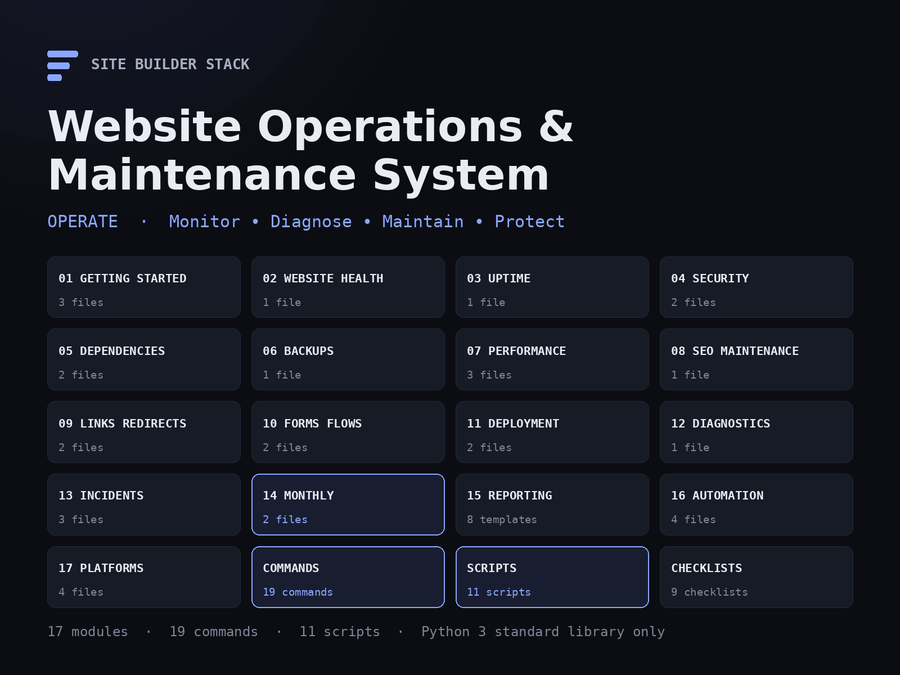
Your website is live. Now keep it healthy.
A complete operating system for running a production website with Claude Code — monitoring, security checks, dependency updates, backup verification, performance regression, SEO maintenance, deployment gates, incident diagnosis and monthly reporting. Not a prompt pack: 17 modules, 19 slash commands, 11 working scripts, 9 checklists, 8 report templates and 4 platform guides, with a safety system that never touches production without your say-so.
The problem
Launching is the short part. What follows is years of small things going wrong quietly: a certificate that stops auto-renewing, a contact form that has delivered nothing since the mail provider tightened its rules, a plugin two majors behind with a published exploit, a deploy that took the checkout button off mobile, a backup nobody has ever restored, a noindex left on after a migration. None of them announce themselves. Each shows up weeks later as a lost order, a lost ranking, or a Friday-evening outage.
Ask a capable model to “fix the site” and you get a confident change on production with no rollback point and no record. Ask it to “check the site” and you get a paragraph of reassurance based on a page that loaded. Neither is operations.
The solution
Operations is a set of checks with a rhythm, a way of scoring what they find, and a discipline for changing things. This system gives you all three, built to run inside Claude Code:
- Working scripts that measure the site from outside — HTTP, TLS, DNS, headers, exposure, links, redirects, sitemap, endpoints, baseline — and merge into one report with a health score. Standard-library Python; nothing to install.
- Slash commands that run the scripts, read the results, add the parts a script cannot see (backups, forms, flows, logs, dependencies), and write the report in a fixed format.
- A safety system. Every change follows Discover → Analyze → Backup → Change → Test → Validate → Document. Audit commands change nothing. The two that do propose one change with its rollback point and wait for a yes. Secrets are never printed, logged, committed or reported.
- A rhythm: daily, weekly, every deploy, monthly, quarterly — as one-page checklists and as automation samples that run the daily part for you.
What is included
106 files, 17 modules, 19 commands, 11 scripts — about 63,000 words — in one download. Every number here was counted at build time from the bundle, not typed.
| Module | Covers |
|---|---|
01-getting-started |
Setup in ten minutes, the safety system, every configuration value explained |
02-website-health |
The daily health check and how to read its score |
03-uptime |
The four layers of “down”; what to monitor and from where |
04-security |
Transport, headers, exposure probes, platform checks; dependency vulnerabilities by reachability |
05-dependencies |
The inventory; the update plan in batches with rollback points |
06-backups |
Completeness by platform, the three numbers, the monthly restore test |
07-performance |
Measurement, regression bracketing, the baseline file format |
08-seo-maintenance |
Sitemap, robots, canonicals, noindex, structured data, Search Console coverage — keeping what ranks from breaking |
09-links-redirects |
Budgeted crawling; redirect chains, loops, codes and gone rules |
10-forms-flows |
Forms end to end including delivery; critical flows with a Playwright shape |
11-deployment |
The nine-question pre-deploy gate; the ten-minute post-deploy check; rollback by provider |
12-diagnostics |
Log analysis in a fixed seven-section format, with redaction rules |
13-incidents |
SEV-1 to SEV-4, the first ten minutes, ten playbooks |
14-monthly |
The two-hour monthly session; the flagship audit with per-area scoring |
15-reporting |
Eight report templates, from the daily health report to the executive summary |
16-automation |
A check runner, a crontab, two GitHub Actions workflows |
17-platforms |
Shopify, WordPress, Astro and static hosts, Node.js |
Plus commands/ with 19 slash commands for .claude/commands/, scripts/ with 11 scripts, templates/ with the CLAUDE.md site block and operating rules, the config file, the critical-URL list and the baseline format, checklists/ with all nine, and examples/ with a real operations report from this store and three worked examples.
The commands
| Command | What it does |
|---|---|
/website-health-check |
Up, TLS, DNS, headers, sitemap, redirects, link sample, baseline — scored, in five minutes |
/website-operations-audit |
Flagship. Every area checked and scored; the master report and operations-report.json
|
/security-check |
TLS, forced HTTPS, security headers, exposure probes, platform checks |
/dependency-audit → /update-plan
|
Inventory and advisories ranked by reachability; updates in batches, staging first, rollback named |
/check-backups |
Existence, completeness, age, off-site; the monthly restore test |
/performance-check / /performance-regression
|
Server and browser measurements against the baseline; bracket a slowdown to the change that caused it |
/seo-maintenance-check |
Sitemap, robots, canonicals, noindex, titles, structured data, Search Console |
/link-check / /redirect-audit
|
Every broken or bent link with the fix; every redirect one hop, permanent, correct |
/check-forms / /check-critical-flows
|
Each form through to delivery; each flow on desktop and mobile, in test mode |
/pre-deploy-check → /post-deploy-check
|
GO or NO-GO before; KEEP or ROLL BACK after |
/log-analysis |
A log window into Executive Summary, Likely Cause, Immediate Checks, Diagnostic Commands, Remediation, Validation, Rollback |
/incident-diagnose |
Confirm, classify, restore, stabilise, diagnose, report |
/monthly-maintenance → /generate-maintenance-report
|
The monthly session; the report with Overall Health Score: NN/100 and the executive summary |
The scripts
check_http, check_ssl, check_dns, check_headers, crawl_links, audit_redirects, validate_sitemap, test_endpoints, compare_baseline, generate_report, read_config. Python 3.8 or newer, standard library only. Each has --help and --json, and all use the same exit codes (0 pass, 1 warning, 2 fail, 3 could not run) so a scheduler can read them. One command runs the core set and writes the scored report:
python3 ops/scripts/generate_report.py --run https://your-site.example
Overall Health Score: 94/100 — Healthy
That line is from the sample report in examples/, which is a real, unedited run against this store. The warnings in it are real too.
Who it is for
Anyone responsible for a website that is already live: developers who built it and now keep it, freelancers and agencies maintaining client sites, founders running their own store, and the person who inherited “the website” with a login and no documentation. It assumes you can run a command and reach the site. It does not assume you have done operations before — the checklists and the safety system are there so that you do it the careful way from the first day.
If the site is not built yet, this is the wrong product; start with the Website Launch System. If it is built and nobody is arriving, the SEO & Website Audit Toolkit. If people arrive and do not buy, the Conversion & Revenue Optimization Toolkit. This one is for keeping a live site live.
Platforms
Four guides, one per platform, each saying what the platform handles for you, what it does not, where each lever is, and what every check adds on that platform: Shopify (apps and permissions, theme rollback, what to export because Shopify does not back it up for you), WordPress (host-managed versus self-hosted, item by item; plugins, PHP end-of-life, mail delivery, debug logs), Astro and static sites (build-time risk, header and redirect files, form services, secrets in the bundle) and Node.js applications (the health endpoint, logs, database backups, process restarts, migrations that cannot be rolled back). The scripts and the commands are the same on all four.
Before and after
| Before | After |
|---|---|
| You find out the site is down from a customer | The four-layer check — DNS, TLS, host, application — runs every five minutes and tells you which layer |
| “The contact form works, it loads” | One tagged test submission a week, confirmed in the real inbox, with SPF and DKIM checked when it is not |
| Deploy, refresh the homepage, go home | A nine-question gate before; a ten-minute check after that says KEEP or ROLL BACK |
| Backups exist, probably | Age, restore time, and the date of the last verified restore — measured monthly |
| Twenty-three outdated packages and no plan | Three batches, each with a rollback point, applied on staging first |
| A fix on production in the same breath as the discovery | Discover → Analyze → Backup → Change → Test → Validate → Document, with a yes before Change |
| “How is the site doing?” — “Fine, I think” | A monthly report with a score, a trend, and the three things being done next month |
The recurring workflow
| When | What | Time |
|---|---|---|
| Daily |
/website-health-check, or the automated run and a glance at the monitor |
3 minutes |
| Weekly | Security, links, forms, flows, SEO short form, backup existence | 30–45 minutes |
| Every deploy |
/pre-deploy-check → deploy → /post-deploy-check
|
15 minutes |
| Monthly | The full audit, the restore test, the dependency plan, the report | 2 hours |
| Quarterly | Access, expiry dates, configuration drift, third parties | 1–2 hours |
Each is a one-page checklist in checklists/. The daily and weekly checks can run themselves from cron or GitHub Actions with the samples in 16-automation/; the changes never do.
What it will not do
It will not run penetration tests. The security check reads headers and TLS and probes a fixed list of paths that must never be public. It attempts no logins, injection, fuzzing or load, and it says so. Application security testing is a separate engagement with a written scope.
It will not automate a change. Checks are scheduled; changes are authorised one at a time with a rollback point named first. That is the design, not a limitation.
It will not hide a finding to improve the score. The score is computed from the findings by a script. Accepted findings are listed as accepted, not deleted, and anything that could not be checked is reported as not verified rather than as a pass.
How it fits with the other three
| Operations & Maintenance | Website Launch System | SEO & Website Audit | Conversion & Revenue | |
|---|---|---|---|---|
| Price | $39.99 | $19.99 | $19.99 | $19.99 |
| Stage | Operate | Build | Rank | Convert |
| Best for | A live site you must keep healthy | A site you are building | A site that is not ranking | Traffic that under-converts |
| Uptime, incidents, playbooks | Complete | Not covered | Not covered | Not covered |
| Security hygiene and dependency updates | Complete, recurring | One-time audit at launch | Not covered | Not covered |
| Backups and restore testing | Complete | Not covered | Not covered | Not covered |
| Deployment gates | Complete | Setup of CI/CD | Not covered | Not covered |
| Log analysis and diagnostics | Complete | Not covered | Not covered | Not covered |
| Performance | Regression against a baseline | Included at build | Core Web Vitals in full | Conversion effect only |
| SEO | Maintenance only | Included at build | Complete | Not covered |
| Conversion | Forms and flows must work | One landing-page workflow | Not covered | Complete |
| Working scripts | 11, standard library | Not included | Not included | Not included |
| Monthly reporting | Complete | Not covered | Not covered | Not covered |
The three earlier products are also sold together as the Complete Site Builder Stack. This one is separate: it starts where they finish, and it is the only one of the four that you will use every week for as long as the site exists. Buying it does not include the others, and there is no automatic upgrade credit.
Delivery and licence
A single ZIP, delivered by download immediately after purchase. 106 files, about 220 KB — Markdown, Python, YAML and a shell script; nothing to install beyond Python 3, which your machine almost certainly has. A published SHA-256 checksum accompanies the download so you can verify what you received.
Licensed to one person for unlimited websites, including client work. You may not redistribute or resell it. Full terms are in LICENSE.md inside the archive.
What is not promised
No uptime figure, no security guarantee, no ranking. A passing check covers what the check measured and nothing more, and the reports say what they did not check. What you get is a way to know, every day, whether the site is as healthy as it was yesterday — and a careful, recorded way to change it when it is not.
Inside the Website Operations & Maintenance System
No video is published yet. Below is the same walkthrough it will narrate, in a form that works today.
-
What lands in your inbox
One ZIP. Seventeen numbered modules, 19 slash commands, 11 scripts, 9 checklists, 8 report templates, 4 platform guides and the CLAUDE.md template — about 63,000 words plus working code. Python 3 standard library only; nothing else to install.
claude-code-website-operations-maintenance-system/ START-HERE.md QUICK-START.md 01-getting-started/ 02-website-health/ ... 17-platforms/ commands/ scripts/ templates/ checklists/ examples/ -
The first ten minutes
Copy the commands into .claude/commands/, the scripts into ops/, fill the site block at the top of CLAUDE.md, and run the first check. The report has a score, a list of anything broken, and the one to three things to do today.
cp commands/*.md your-site/.claude/commands/ cp -r scripts your-site/ops/ cp templates/CLAUDE.md your-site/CLAUDE.md cd your-site && claude > /website-health-check -
The scripts measure; the commands explain
Ten checks — HTTP, TLS, DNS, headers, exposure, sitemap, redirects, links, endpoints, baseline — each a script with --help, --json and the same exit codes. One command runs the core set and merges them into a scored report. The slash commands run the scripts, read the JSON, and add the parts a script cannot see.
$ python3 ops/scripts/generate_report.py --run https://your-site.example Overall Health Score: 94/100 — Healthy Health 100 PASS TLS/SSL 100 PASS DNS 95 WARNING Security 80 WARNING Sitemap 100 PASS Redirects 100 PASS Links 85 WARNING wrote operations-report.md and operations-report.json -
Every change follows seven phases
Discover, Analyze, Backup, Change, Test, Validate, Document — in that order, with no phase skipped. Audit commands stop after Analyze. The two commands that change things propose one change and wait for a yes.
PROPOSED CHANGE What: Redirect /old-catalog to /collections/all (301) Where: Shopify admin → Navigation → URL redirects Why: 47 inbound links return 404 (link-check, 2026-09-13) Rollback: Delete the redirect; ten seconds; no data affected Risk: Low. Affects only requests to a URL that 404s today. Proceed? (yes / no / change it) -
The flagship audit scores every area
/website-operations-audit runs the scriptable checks and then walks the seven areas a script cannot see — uptime, dependencies, backups, performance in the browser, SEO coverage, forms and flows, deployment readiness — and merges all of it into the master report and operations-report.json. An area that could not be checked is excluded from the score and listed, never marked as passing.
# Website Operations Audit — Northwind Supply Website · Date · Environment · Overall Score: 88/100 — Needs attention | Area | Score | Status | | Health | 100 | PASS | | Backups | 50 | FAIL | never verified | Dependencies | 45 | FAIL | PHP 7.4; 4 reachable advisories | Forms & flows | 50 | NOT VERIFIED ... -
Deploys have a gate on both sides
Before: nine questions — the change is enumerated, builds, tests pass, staging passes, production is healthy right now, the rollback point exists and is named. After: ten minutes, cheapest checks first, and the first line of the report is KEEP or ROLL BACK.
> /pre-deploy-check main..release 1. What is changing? 3 commits, 5 files ✓ ... 6. Rollback point? deploy dpl_8f2…, 20 s ✓ GO > /post-deploy-check KEEP — 12/12 endpoints pass; baseline within tolerance; no new log messages -
Incidents: restore first, diagnose second
The first ten minutes are written down: confirm from outside, name the layer (DNS, TLS, host, application), name the severity (SEV-1 to SEV-4), tell the owner, find the last change, propose the rollback. Ten playbooks cover the incidents every site eventually has. The diagnosis afterwards uses a fixed seven-section format.
Executive Summary Likely Cause Immediate Checks Diagnostic Commands Remediation (proposed, not applied) Validation Rollback -
Secrets stay where they are
Read where they live; never printed, logged, committed, reported or pasted. Diagnostic output is redacted before it is quoted. The security check tests for the exposure of secrets — /.env, /.git/HEAD, backup files served publicly — without reading them. A build-time check refuses to package the product if a credential pattern is anywhere in it.
postgres://app:••••••@db.internal/prod Authorization: Bearer •••••• CRITICAL exposure served as a file: /.env (text/plain, 1,204 bytes). Block now, then rotate any credentials inside. -
A rhythm, on one page each
Daily (three minutes, or zero with the automation), weekly (thirty to forty-five), every deploy (fifteen), monthly (two hours, including the restore test), quarterly (access, expiry, drift). Nine checklists. The monthly report carries the score, the three-month trend, and next month's three to five items.
checklists/ DAILY.md WEEKLY.md MONTHLY.md QUARTERLY.md PRE-DEPLOYMENT.md POST-DEPLOYMENT.md INCIDENT.md SECURITY.md BACKUP.md 16-automation/ run-checks.sh crontab.sample github/site-health.yml github/post-deploy-check.yml -
Four platforms, one method
Shopify, WordPress, Astro and static hosts, Node.js. Each guide says what the platform handles for you, what it does not, where each lever is, and what every check adds there. The scripts and the commands are the same on all four.
17-platforms/
  SHOPIFY.md        apps and permissions · theme rollback · what to export
  WORDPRESS.md      host vs you, item by item · plugins · PHP EOL · mail
  ASTRO-STATIC.md   build-time risk · _headers · _redirects · bundle secrets
  NODEJS.md         /healthz · logs · database backups · migrations
The recorded walkthrough is not published yet. Rather than put a play button over a still image, the steps above are the same tour in writing — the real folder names, the real commands, and the real output the scripts produce.
The sample operations report inside the download is a real, unedited run against this store.
Before you buy
The questions people ask about a maintenance product, answered plainly.
No system can promise that, and this one does not. What it does is make sure you find out within minutes rather than from a customer, that you know which layer failed, that you have a rollback point named before every change, and that the things that quietly break — certificates, forms, backups, dependencies — are checked on a schedule instead of discovered. Most outages are one of a short list of causes; the playbooks cover that list.
No. The security check reads TLS and headers and probes a fixed list of paths that must never be public. It attempts no logins, injection, fuzzing or load, and the product says so in every relevant file. It tells you the basics are in place so that an application security review, if the site needs one, does not spend its first day on headers.
Never. The checks are scheduled; the changes are not. Seventeen of the nineteen commands are audits that change nothing. The two that can change things — the update plan and the remediation inside incident diagnosis — propose one specific change with its rollback point and wait for your yes. That is the design, and the operating rules in the CLAUDE.md template enforce it on every run.
The Launch System audits a site once, at launch, and sets up CI/CD. This system checks it every week for as long as it exists, with a baseline to compare against, a change log, incident playbooks, backup verification, dependency batches and a monthly report. Where they overlap, this one refers to the Launch System for the build-time setup and takes over from the first deploy onwards.
Shopify, WordPress (managed or self-hosted, including WooCommerce), Astro and other static sites on Netlify, Vercel, Cloudflare Pages or GitHub Pages, and Node.js applications on a server or a container platform. Each has its own guide. The scripts look at a site from the outside, so they work on anything with a URL.
Python 3.8 or newer, which almost every machine already has, and Claude Code. The scripts use only the standard library — no pip install, no virtual environment. The critical-flow examples use Playwright, which is optional and separately installed; the flows can be walked by hand.
One ZIP: 17 numbered modules, 19 slash commands for .claude/commands/, 11 scripts, 9 checklists, 8 report templates, 4 platform guides, the CLAUDE.md template with the site block and operating rules, configuration templates, automation samples for cron and GitHub Actions, a real operations report from this store, and three worked examples. Every count is generated from the bundle at build time.
Not at present. The bundle is the three earlier stages — build, rank, convert. This is the fourth, and it is sold on its own. Buying it does not include the others, and there is no automatic upgrade credit.
Yes, without limit. The licence is one person, unlimited websites, including commercial and client work. Reports you produce with it are yours. You may not redistribute or resell the system itself.
Operate is the stage that lasts longest
This system assumes the site exists, is found, and converts. Building it, ranking it, converting the traffic — and, on Shopify, automating the admin — are the other four jobs.
-
Build & launch
The Claude Code Website Launch System
Planning, platform build systems, a production CLAUDE.md, security and accessibility audits, 100 prompts and launch checklists.
$19.99
-
Get found
Claude Code SEO & Website Audit Toolkit
Crawlability, indexation, structured data, Core Web Vitals and Search Console — twenty audits in dependency order.
$19.99
-
Convert
Claude Code Conversion & Revenue Optimization Toolkit
Find where a site loses conversions, rank what to fix by evidence, and prove the fix worked — 70 workflows and 68 commands.
$19.99
-
Migrate
Claude Code Website Migration & Replatforming System
Inventory every URL, map it, generate and test the redirects, compare metadata and structured data page by page, record DNS before it is touched, and get a GO / GO WITH WARNINGS / NO-GO from evidence. For the weeks a site is moving.
$29.99
-
The first three
Complete Site Builder Stack
Build, rank and convert in one purchase — the three earlier stages, delivered as three downloads.
$39.99
-
Deliver
Claude Code Agency & Client Delivery System
Discover, scope, propose, onboard, build, review, launch, hand off and retain website clients — the engagement around the technical work, as commands that read one set of files per client. For freelancers and agencies.
$39.99
Each solves a different stage. The whole lifecycle is explained here if you are not sure which you are in.
Not built, found, or converting yet?
The Complete Site Builder Stack is the three stages before this one — the Website Launch System, the SEO & Website Audit Toolkit and the Conversion & Revenue Optimization Toolkit — in one purchase.
A separate product. Buying this does not include it, and there is no automatic upgrade credit.