Claude Code Website Migration & Replatforming System
Move your website without losing what matters. Plan, execute and validate migrations with Claude Code — every URL inventoried and mapped, every redirect tested, metadata and structured data compared page by page, DNS recorded before it is touched, and a scorecard that says GO, GO WITH WARNINGS or NO-GO from evidence.
One payment. Instant download. Licensed to one person for unlimited sites, including client work. Not affiliated with WordPress, Shopify, Astro or any host.
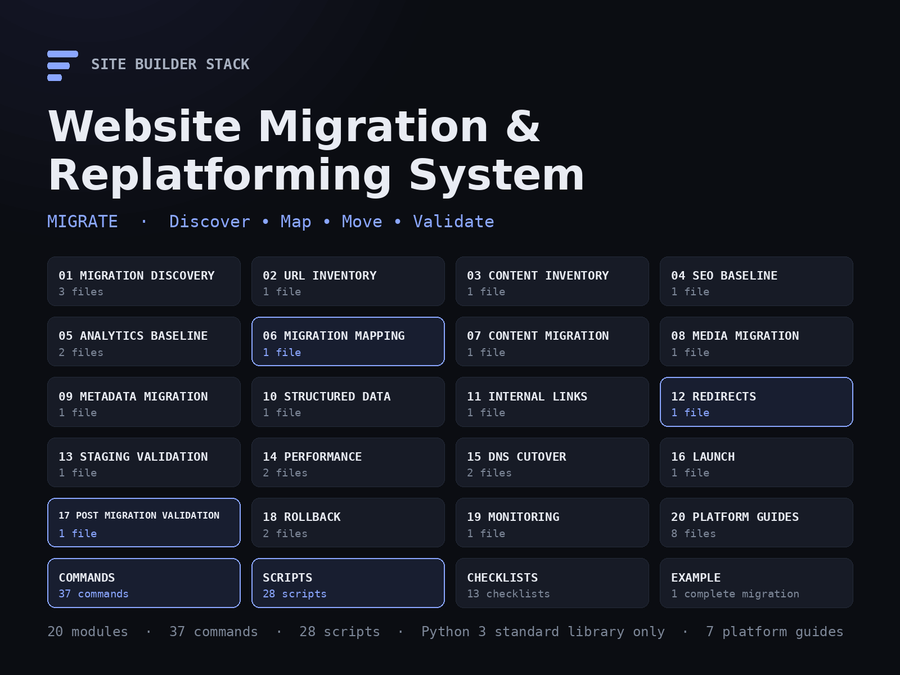
Move Your Website Without Losing What Matters.
Plan, execute and validate website migrations with Claude Code — WordPress to Astro, WordPress to Shopify, host and theme moves, Shopify replatforming, static sites, domain changes, URL-structure changes. Every URL inventoried, every page mapped, every redirect tested, metadata and structured data compared page by page, media and forms and analytics verified, DNS recorded before it is touched, and a scorecard that says GO, GO WITH WARNINGS or NO-GO from evidence. Not a prompt pack: 28 working scripts, 37 Claude Code commands, 20 modules including seven platform guides, 13 checklists, and a complete fictional migration to read before you run your own.
The problem
A migration is not a copy. The new site builds, deploys, looks right — and three weeks later the search traffic is half what it was, a partner’s link lands on a 404, the contact form has been posting to nothing, the images break when the old hosting is cancelled, and nobody can say which of the 1,400 old URLs were supposed to go where. The deployment succeeded. The migration failed. Most of what was lost was not on anyone’s list, because nobody made the list.
Ask a capable model to “migrate the site” and you get the other failure: content converted without its metadata, every missing page redirected to the homepage, production launched with staging’s noindex still set, the DNS panel opened before anyone wrote down what was in it.
The solution
A structured migration system that runs inside Claude Code and treats a migration as what it is — a mapping and validation exercise:
DISCOVER → INVENTORY → BASELINE → MAP → BUILD → MIGRATE → VALIDATE → CUT OVER → MONITOR → ROLL BACK IF NECESSARY- Working scripts for the parts a machine should do: a crawler that builds the URL inventory with status, metadata, canonicals, indexability, links, images, forms and structured data; a URL map drafter; an HTML → Markdown converter that flags what it could not convert; a redirect generator for nginx, Apache, Netlify, Vercel, Shopify and Cloudflare that refuses loops, chains and homepage dumps; a redirect tester that reports valid, missing, loop, chain, wrong destination and dead target; URL, metadata and schema comparison; canonical, robots and sitemap checks; an internal-link audit; an old-domain scan; a DNS inventory with before/after comparison; a critical-page validator; a rollback-readiness check; and the audit that scores it all. Python standard library only; nothing to install.
- Claude Code commands that run the scripts, read the results and explain them — each marked READ ONLY, MODIFIES FILES or PRODUCTION IMPACT POSSIBLE, each with its purpose, inputs, preconditions, safety rules, steps, expected output, validation and rollback written down.
- A clear line between what is automatable (inventory, compare, generate, test), semi-automatable (the map, the conversion — the scripts draft, a person decides) and manual (what a page becomes, DNS, forms, checkout, the go/no-go call). Per migration type, in a matrix.
- Seven platform guides with the facts that change the plan: what each platform exports and imports, where its redirects live, its URL conventions, and what always breaks.
What is included
190 files, 20 modules, 37 commands, 28 scripts, 7 platform guides, 13 checklists, 6 report templates — about 78,000 words plus working code. Every number here was counted from the bundle at build time.
| Module | Covers |
|---|---|
01-migration-discovery |
The facts before the plan: platforms, hosting, DNS, counts, forms, integrations, analytics, rollback; the questionnaire and the report |
02-url-inventory |
Crawl + sitemap + Search Console + analytics + logs, merged and reconciled — the baseline every comparison is measured against |
03-content-inventory |
Content types, thin/empty/duplicate/orphan flags, a migration method per row |
04-seo-baseline |
Titles, descriptions, canonicals, robots, H1s, schema types frozen; the exports only a person can take |
05-analytics-baseline |
Loaders and IDs on every page; events, consent, the numbers from before |
06-migration-mapping |
The URL map as the contract: KEEP / MOVE / MERGE / REMOVE, by rule and by hand, never to the homepage |
07-content-migration |
Convert, import or rebuild; HTML to Markdown with a review list; frontmatter and slugs from the map |
08-media-migration |
Every image and file inventoried, moved, validated; the old host kept until references are zero |
09-metadata-migration |
Metadata carried, then compared; the three failures that take sites out of the index |
10-structured-data |
JSON-LD per type re-implemented and compared, subtypes recognised |
11-internal-links |
Links rewritten from the map, audited for broken, old-domain, staging, redirect |
12-redirects |
Map, validate, generate for six platforms, deploy where they belong, test on the real origin |
13-staging-validation |
Everything provable before DNS, in one run; what staging cannot prove, listed |
14-performance |
Timing facts before and after, like for like |
15-dns-cutover |
Record, lower TTL, change only the web records, verify, never touch mail |
16-launch |
Go / no-go rules, roles, the first hour, search engines told |
17-post-migration-validation |
The full audit on the live domain; the scorecard and how it is computed |
18-rollback |
Readiness verified as facts; the decision matrix; the procedure |
19-monitoring |
24 hours, 7 days, 30 days; 404 triage; when to decommission |
20-platform-guides |
WordPress → Astro, WordPress → Shopify, WordPress → WordPress, Shopify replatforming, Static → Astro, domain migration, URL-structure migration |
Plus .claude/commands/ with 37 slash commands, scripts/ with 28 scripts, templates/ with migration-config.yaml, the inventory, map, redirect, critical-page, DNS and risk-register CSVs, the cutover plan, the launch-readiness sheet, a CLAUDE.md and six redirect configuration samples, 13 checklists, 6 report templates, a reference set (the automation matrix, go/no-go and rollback matrices, monitoring windows, troubleshooting) and examples/wordpress-to-astro/ — a complete fictional migration with every inventory, map, comparison and report, produced by running the scripts.
The commands
| Command | Mode | Purpose |
|---|---|---|
/migration-discovery · /migration-plan
|
Read / Files | The facts, then the plan with gates, the automatable/manual split and a seeded risk register |
/url-inventory · /target-url-inventory · /url-map · /url-coverage
|
Read / Files | Source and target inventories in one shape; the map; UNCHANGED / REDIRECTED / REMOVED / MISSING / BROKEN |
/content-inventory · /media-inventory · /media-validation
|
Read | What each URL is and what happens to it; every file, where used, whether it resolves |
/seo-baseline · /analytics-baseline · /performance-baseline · /dns-inventory
|
Read | The “before”: metadata, tracking, timings, and every DNS record including the ones that must not change |
/content-migration · /metadata-migration · /content-normalize
|
Files | HTML to Markdown with a review list; metadata into the target’s format; shortcodes, headings, paths tidied |
/redirect-map · /redirect-config · /redirect-validation
|
Files / Read | The validated map; the platform’s configuration; PASS / CHAIN / WRONG-CODE / WRONG / MISSING / LOOP / DEAD |
/metadata-compare · /schema-compare · /internal-link-audit · /old-domain-scan · /tracking-validation
|
Read | Page-by-page comparisons; links; references to the old and staging hosts; expected IDs on every page |
/critical-page-validation · /form-validation
|
Read | The pages the business cannot lose, strictly; forms proven by a submission, not by presence |
/staging-validation · /performance-compare
|
Read | Everything checkable before DNS moves; timings after against before |
/rollback-readiness · /cutover-plan · /pre-launch-check · /migration-go-no-go
|
Read / Files | Facts a rollback needs; the exact DNS changes; the last gate; the recorded decision |
/migration-cutover · /migration-rollback
|
Production | Step by step, each change quoted and confirmed, the rollback path stated first |
/post-migration-audit · /website-migration-audit · /migration-report
|
Read / Files | The master audit on the live domain: scorecard, findings by severity, GO / GO WITH WARNINGS / NO-GO; the client report |
The scorecard
URL Coverage:            100%
Redirect Integrity:       94%
Metadata Preservation:    73%
Canonical Integrity:     100%
Internal Links:          100%
Media Integrity:         100%
Analytics:               PASS
Forms:                   PASS
Critical Pages:          PASS

Overall Migration Health: 94/100
LAUNCH RECOMMENDATION: GO WITH WARNINGS
That is the example migration’s real output. The score is the mean of the six percentages, minus ten per failure among analytics, forms and critical pages; any blocker — a critical page down, checkout broken, redirect gaps, DNS unrecorded, a certificate failure, the target unreachable, no verified backup, analytics absent when the business depends on it, production noindexed, canonicals pointing at staging, forms broken — makes it NO-GO regardless of the number. Every line names the file it was computed from; anything not measured is reported as NOT CHECKED, not scored. The score orders the work. It does not predict rankings or traffic and it is not a guarantee.
Use cases
- Move a WordPress site to Astro on Netlify or Vercel with every post converted, every archive mapped, every redirect tested.
- Replatform a content site to Shopify: products, blog and pages into Shopify’s fixed URL structure, redirects as a CSV the admin accepts, checkout on the critical-page list.
- Change a WordPress host or theme and prove the metadata and structured data survived the theme swap.
- Change domains: every URL redirected in one hop, both zones recorded, mail untouched, Search Console told in the right order.
- Flatten a URL structure and rewrite internal links from the map instead of relying on redirects.
- Take a static HTML folder into Astro with the shared markup componentised and the
.htmlURLs decided, not defaulted. - Validate a migration someone else did: crawl, compare, score, list what was lost.
- Roll back deliberately, from the recorded DNS, when a blocker cannot be fixed forward.
Who it is for
Developers and agencies doing migrations for clients; site owners moving their own site; SEO practitioners who need the before, the after and the difference in a file; operators inheriting a migration that was never validated. It assumes you can run a command and read a CSV. It does not assume you have migrated a site before — the discovery module and the platform guides are written for a first one, and the example is a whole migration you can read end to end.
Safety
Every command declares its mode. Read-only commands write only reports and inventories. File-modifying commands announce every path first. Production-impact commands — the cutover and the rollback — quote each DNS record, old value and new, and wait for a yes; the current zone is recorded before the panel is opened, and only the web records in the plan change. The system will not destroy the source before the target is validated, change DNS without the record, delete redirects without review, redirect missing pages to the homepage, launch without rollback preparation, or leave production noindexed or canonicalised to staging — those are its ten rules, in every command. Credentials for hosting, DNS and the CMS stay with you; the scripts never read, print or store them.
How it fits with the other five
| Migration & Replatforming | Website Launch System | SEO & Website Audit | Conversion & Revenue | Operations & Maintenance | Shopify Automation | |
|---|---|---|---|---|---|---|
| Price | $29.99 | $19.99 | $19.99 | $19.99 | $39.99 | $39.99 |
| Stage | Migrate | Build | Rank | Convert | Operate | Automate Shopify |
| Best for | A site that is moving | A site you are building | A site that is not ranking | Traffic that under-converts | A live site to keep healthy | A Shopify catalogue at scale |
| URL mapping, redirects, cutover, rollback | Complete | Launch-day checks only | Redirect audit only | Not covered | Redirect audit only | Shopify redirect list |
| Before/after comparison of metadata, schema, links, media | Complete | Not covered | Site-wide audit, one point in time | Not covered | Baseline comparison | Catalogue only |
| Working scripts | 28, standard library | Not included | Not included | Not included | 11, standard library | 32, standard library |
| Platform guides | 7 migration guides | Build systems per platform | Not covered | Not covered | 4 platform guides | Shopify only |
The first three are also sold together as the Complete Site Builder Stack. This one is separate and specific: it is for the weeks a site is moving. Before the move, the SEO & Website Audit Toolkit gives the baseline audit; after it, the Operations & Maintenance System keeps the new site healthy; a Shopify destination pairs with the Shopify Automation Toolkit for the catalogue import. Buying this one does not include the others, and there is no automatic upgrade credit.
Delivery and licence
A single ZIP, delivered by download immediately after purchase. 190 files, about 300 KB — Markdown, Python, CSV, YAML and configuration samples; nothing to install beyond Python 3, which your machine almost certainly has. A published SHA-256 checksum accompanies the download so you can verify what you received.
Licensed to one person for unlimited sites, including client work. You may not redistribute or resell it. Full terms are in LICENSE.md inside the archive. WordPress, Shopify, Astro, Netlify, Vercel and Cloudflare are trademarks of their owners; this product is independent and not affiliated with or endorsed by any of them.
What is not promised
No ranking, no traffic figure, no guarantee that a migration loses nothing. The system inventories what there was, compares it with what there is, and lists the difference with a severity and a fix; the decisions — what a page becomes, when to cut over, whether to roll back — are yours, and it is built so that they stay yours and are recorded.
Inside the Website Migration & Replatforming System
No video is published yet. Below is the same walkthrough it will narrate, in a form that works today.
-
What lands in your inbox
One ZIP. Twenty numbered modules including seven platform guides, 37 slash commands, 28 scripts, templates for every file the migration produces, 13 checklists, six report templates, a reference set and a complete fictional migration — about 78,000 words plus working code. Python 3 standard library only.
claude-code-website-migration-replatforming-system/ START-HERE.md QUICK-START.md 01-migration-discovery/ 02-url-inventory/ ... 19-monitoring/ 20-platform-guides/ .claude/commands/ scripts/ templates/ checklists/ reports/ reference/ examples/wordpress-to-astro/ -
The first ten minutes
Copy the commands and scripts into the project, fill source.url in migration.yaml, and run discovery: the platform, the URL count by type, the media, the forms, the analytics, the DNS records, and the open questions.
cp .claude/commands/*.md your-site/.claude/commands/ cp scripts/*.py your-site/migration/scripts/ cp templates/migration-config.yaml your-site/migration/migration.yaml claude > /migration-discovery https://old.example.com -
The inventory, then the baseline
The crawler builds one row per URL: status, final URL, title, description, canonical, robots, H1, indexability, word count, links in and out, images, forms, JSON-LD types, how it was discovered. Sitemap, Search Console and analytics exports are merged so nothing that ranks without a link is missed. Then the SEO baseline freezes it, and the DNS inventory records the zone.
$ python3 migration/scripts/crawl_site.py https://old.example.com --out migration/source-url-inventory.csv --seed sitemap crawling old.example.com (max 5000, depth 8, 19 seed URL(s)) crawled 21 URL(s): 20 ok, 1 redirect, 0 error/4xx/5xx $ python3 migration/scripts/seo_baseline.py migration/source-url-inventory.csv --out migration/seo-baseline $ python3 migration/scripts/dns_inventory.py old.example.com --dig migration/dig.txt --out migration/dns-before.csv DNS INVENTORY — old.example.com: 9 record(s) (web 2, mail 4, verification 1, ...) -
The map is the contract
One row per source URL, one decision per row: KEEP, MOVE, MERGE, REMOVE. The script drafts it from rules and slug matches; a person decides the rest. Every comparison and every redirect reads this file.
$ python3 migration/scripts/url_map.py --source migration/source-url-inventory.csv --target migration/target-url-inventory.csv --rule '^/blog/(.+)=/posts/\1' --out migration/url-map.csv URL MAP DRAFT — 21 source URL(s): KEEP 6 MOVE 12 REVIEW 3 REVIEW /tag/fixings nothing matched: MOVE, MERGE or REMOVE? REVIEW /author/admin noindex on source REVIEW /blog/delivery-updates-2025 -
Redirects: generated, validated, tested
The redirect map comes from the URL map. The generator refuses loops, chains, duplicate sources and homepage dumps before it emits a line, then writes nginx, Apache, Netlify, Vercel, Shopify CSV or Cloudflare Bulk Redirects. The tester follows every rule on the real origin.
$ python3 migration/scripts/generate_redirects.py migration/redirect-map.csv --format netlify > _redirects emitted 17 rule(s) as netlify $ python3 migration/scripts/test_redirects.py migration/redirect-map.csv --origin https://www.example.com REDIRECT VALIDATION — 17 rule(s) tested PASS 16 WRONG-CODE 1 WRONG-CODE /feed got 302, expected 301 -
Page by page, before against after
Titles, descriptions, canonicals, robots, H1s and schema types compared through the map: MATCH, CHANGED, MISSING, ADDED, REVIEW. A moved page whose canonical followed it is a match; a canonical pointing at staging is a review. Structured data subtypes are recognised — Article to BlogPosting is a change, not a loss.
$ python3 migration/scripts/compare_metadata.py --source ... --target ... --map migration/url-map.csv --critical migration/critical-pages.csv field MATCH CHANGED MISSING ADDED REVIEW title 16 4 0 0 0 meta_description 15 4 1 0 0 canonical 20 0 0 0 0 MISSING /blog/torque-settings-guide meta_description -
Staging: everything provable before DNS
One run: target crawl seeded from the map, coverage, metadata, schema, critical pages, internal links, media, canonicals, robots, sitemap, tracking — and two staging-specific expectations: staging should be noindexed; canonicals must point at the production domain. What staging cannot prove is listed for cutover.
$ python3 migration/scripts/staging_validation.py https://preview.example.com --dir migration crawl exit 0 url coverage exit 0 metadata exit 2 critical pages exit 0 internal links exit 1 canonicals exit 0 wrote staging-validation.md -
The scorecard and the recommendation
The audit scores nine areas from the files it finds, names the file behind every number, lists findings by severity and recommends GO, GO WITH WARNINGS or NO-GO. Any blocker is NO-GO regardless of the score. Anything not measured is NOT CHECKED, not scored.
URL Coverage: 100% Redirect Integrity: 94% Metadata Preservation: 73% Canonical Integrity: 100% Internal Links: 100% Media Integrity: 100% Analytics: PASS Forms: PASS Critical Pages: PASS Rollback Readiness: PASS Overall Migration Health: 94/100 LAUNCH RECOMMENDATION: GO WITH WARNINGS -
Cutover, with the record in front of you
The DNS zone was recorded before the panel was opened. The cutover command quotes each record — name, type, old value, new value, TTL — and waits for a yes; only the web records in the plan change; mail, SPF, DKIM, DMARC and verification records are listed as unchanged. Minutes after, the critical pages, robots, canonicals, redirects and tracking are checked on the production domain.
> /migration-cutover go rollback_readiness.py PASS (9/9) DNS: example.com A 203.0.113.44 → 75.2.60.5 (TTL 300) — confirm? yes DNS: www CNAME example.com. → site.netlify.app. — confirm? yes T+5m critical_pages.py 5/5 PASS (Server: Netlify) T+5m check_robots.py PASS T+15m test_redirects.py 16 PASS 1 WRONG-CODE T+15m tracking_check.py G-… on 20/20 -
Rollback is a procedure, not a hope
Readiness is checked as facts before launch: the source still answers, the backup exists and someone restored from it, the DNS record has MX rows, an owner and a window are named, the TTL was lowered. The rollback restores the recorded records one at a time, compares the zone, verifies the source pages, and writes the report.
$ python3 migration/scripts/rollback_readiness.py --config migration.yaml --dir migration
  PASS  source preserved       200; config source_preserved=True
  PASS  backup restore tested  backup_restore_tested=True
  PASS  DNS recorded           dns-before.csv: 9 records, types A,CAA,CNAME,MX,TXT
  PASS  owner named            rollback.owner=M. Okafor
  PASS  DNS TTL lowered
overall: PASS
The recorded walkthrough is not published yet. Rather than put a play button over a still image, the steps above are the same tour in writing — the real folder names, the real commands, and the real output the scripts produce.
The example migration inside the download was produced by running these scripts end to end against a fixture site; only the hosts were renamed.
Before you buy
The questions people ask about a migration product, answered plainly.
Not without you. Read-only commands write only reports and inventories into the migration folder. File-modifying commands announce every path before writing. The two production-impact commands, cutover and rollback, quote each change and wait for a yes, and neither can change DNS itself: the operator makes the change in the provider and pastes the result. The scripts never hold hosting, DNS or CMS credentials.
WordPress to Astro, WordPress to Shopify, WordPress to WordPress (host, theme, permalinks), Shopify replatforming (theme change, store to store, or leaving Shopify), static HTML to Astro, domain changes and URL-structure changes, each with its own guide. The modules and scripts are platform-neutral; the guides carry the platform facts. A migration the guides do not name, Ghost to Hugo say, still uses every module and every script, and reads the closest guide for the shape.
Inventory, baseline, comparison, redirect generation and testing, link and media audits, the old-domain scan, the DNS record, the critical-page check and the audit are automated. The URL map and the content conversion are drafted by the scripts and decided by a person. Building the target, forms, checkout, the DNS change, Search Console and the go/no-go call are manual. The matrix per migration type is in the reference set and in the plan the system writes for your migration.
Python 3.8 or newer, which almost every machine has. The scripts use only the standard library: nothing to install, no package manager, no virtual environment. Claude Code runs the commands; you can also run every script by hand.
It is the mean of six percentages, URL coverage, redirect integrity, metadata preservation, canonical integrity, internal links and media integrity, minus ten for each failure among analytics, forms and critical pages. Any blocker makes the recommendation NO-GO whatever the number. Every line names the file it was computed from, and anything not measured is reported as not checked rather than scored. It orders the work. It is not a prediction of rankings or traffic and not a guarantee of anything.
Nobody can promise that, and this product does not. What it does is make the losses visible before they happen: every URL accounted for, every redirect tested on the real origin, metadata and structured data compared page by page, production checked for noindex and staging canonicals minutes after cutover, and a monitoring plan at 24 hours, 7 days and 30 days that reads Search Console against the baseline. Migrations that lose rankings usually lost something nobody had listed.
Yes. The licence is one person, unlimited sites, including client work, with no expiry. Inventories, maps, audit reports and migration reports you produce are yours to deliver. You may not redistribute or resell the system itself.
The SEO toolkit audits a site at one point in time; the Operations system keeps a live site healthy. This one is for the weeks a site is moving: two inventories, a map between them, redirects generated and tested, and a before/after comparison with a go/no-go. They pair: the SEO toolkit for the pre-migration audit, this for the move, Operations afterwards. Buying one does not include the others.
A complete fictional migration, a small WordPress trade site to Astro on Netlify, with every file the system produces: the discovery report, both inventories, the content and media inventories, the SEO baseline, the DNS record, the plan and risk register, the URL map, the redirect map and generated configuration, the redirect results, the metadata and schema comparisons, the link and media audits, the critical-page results, the audit with its scorecard, the launch checklist as filled, the cutover log and the client report. The CSVs and JSON are real script output against a fixture site; only the hosts were renamed.
The rollback module and command exist for exactly that. Readiness is verified as facts before cutover, so the source is untouched and the DNS record exists; the decision matrix names the triggers and how long to try fixing forward; the rollback restores the recorded records one at a time and verifies. A refund request is considered on its merits, as with every product here.
Moving is one part of a website's life
This system is for the weeks a site is moving. Building it, getting it found, converting the traffic, keeping it healthy and running a Shopify catalogue are the other five jobs.
-
Build & launch
The Claude Code Website Launch System
Planning, platform build systems, a production CLAUDE.md, security and accessibility audits, 100 prompts and launch checklists — for the site you are building the migration into.
$19.99
-
Get found
Claude Code SEO & Website Audit Toolkit
Crawlability, indexation, structured data, Core Web Vitals and Search Console — the audit to run before a migration and again after it settles.
$19.99
-
Convert
Claude Code Conversion & Revenue Optimization Toolkit
Find where the site loses conversions once it has moved — 70 workflows and 68 commands.
$19.99
-
Operate & maintain
Claude Code Website Operations & Maintenance System
Uptime, security, backups, deploys, incidents and monthly reporting — keeping the new site healthy after the 30-day window closes.
$39.99
-
Automate Shopify
Claude Code Shopify Automation & Admin API Toolkit
Products, collections, SEO, metafields, redirects and bulk operations through the Admin GraphQL API — the catalogue side of a Shopify destination.
$39.99
-
Build, rank, convert
Complete Site Builder Stack
The first three systems together on one order — the same three products at the same versions, for less than buying them separately.
$39.99
-
Deliver
Claude Code Agency & Client Delivery System
Discover, scope, propose, onboard, build, review, launch, hand off and retain website clients — the engagement around the technical work, as commands that read one set of files per client. For freelancers and agencies.
$39.99
Each solves a different stage. The whole lifecycle is explained here if you are not sure which you are in.
Keeping the new site healthy afterwards?
The Claude Code Website Operations & Maintenance System watches the site from the outside — uptime, TLS, security headers, links, redirects, deploys, incidents — with a scored health report. This system moves the site; that one keeps it up once the 30-day window closes.
A separate product. Buying this does not include it, and there is no automatic upgrade credit.