Claude Code Shopify Automation & Admin API Toolkit
Automate Shopify with Claude Code. Products, collections, SEO, metafields, inventory, redirects, bulk operations and catalogue auditing through the Admin GraphQL API — with a preview before every write, a backup, and a read-back after.
One payment. Instant download. Licensed to one person for unlimited stores, including client work. Not affiliated with Shopify.
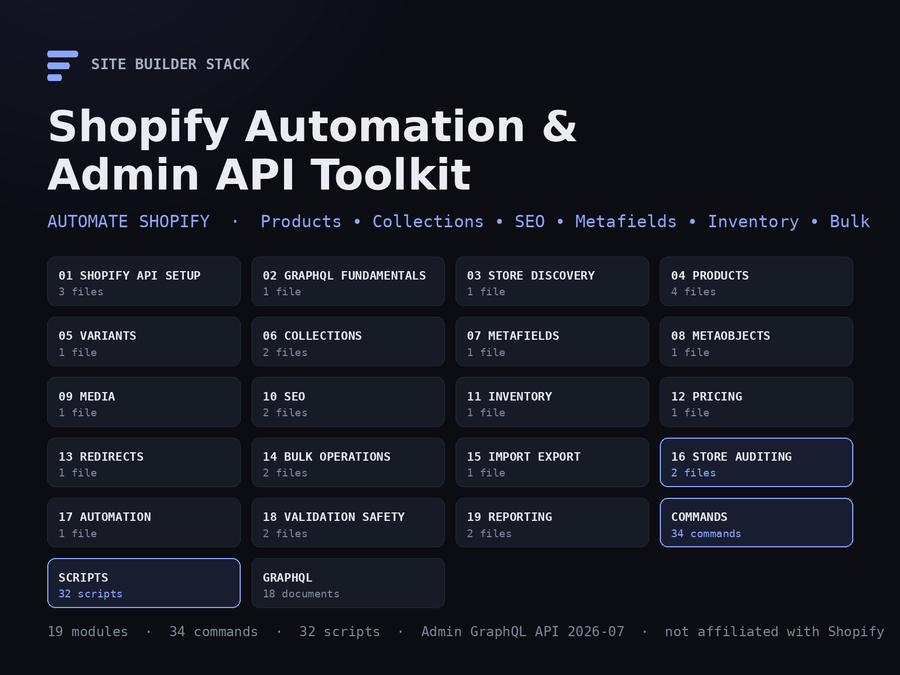
Automate Shopify with Claude Code.
A complete toolkit for products, collections, SEO, metafields, inventory, redirects, bulk operations, catalogue auditing and Shopify Admin API automation — built on the Admin GraphQL API, with a preview before every write, a backup, and a read-back after. Not a prompt pack: 32 working scripts, 34 Claude Code commands, 18 validated GraphQL documents, templates for every input, and 19 modules that say what each workflow does and refuses to do.
The problem
Updating one Shopify product manually is easy. Updating 500 is a workflow problem. Stores accumulate hundreds of products and thousands of variants, and with them: missing SEO titles, descriptions that are the first sentence of the body, images without alt text, vendors spelled four ways, collections that are empty or unpublished, metafields the theme expects and half the products lack, duplicate SKUs the warehouse will find before you do, inventory that says sold out on the storefront, and redirect lists from a migration nobody finished. Each one is a few clicks in the admin. Multiplied by the catalogue, none of them get done.
Ask a capable model to “fix the catalogue” through the API and you get the other problem: a script that rewrites every SEO description unreviewed, a bulk mutation with no export to roll back to, a token pasted into a file that gets committed. Speed without oversight is how a store gets a thousand wrong titles by lunchtime.
The solution
A structured automation system that runs inside Claude Code:
CONNECT → AUDIT → EXPORT → AUTOMATE → VALIDATE → REPORT- Working scripts for every area — a GraphQL client with retries, throttling and cost awareness; export, audit and write scripts for products, variants, collections, metafields, metaobjects, media, SEO, inventory, pricing and redirects; bulk query and bulk mutation with JSONL utilities; a flagship store audit with a catalogue health score. Python standard library only; nothing to install.
- Claude Code commands that run the scripts, read the results, and explain them — each marked READ ONLY or WRITES TO SHOPIFY — REQUIRES EXPLICIT CONFIRMATION.
-
A safety architecture every write follows: discover, export and back up, validate the input, generate a preview, review, confirm, execute, read back, validate, report. Dry run is the default;
--limitcaps every run; empty cells never blank a field; stale rows are skipped rather than overwritten. - Shopify Admin GraphQL API 2026-07, validated live — including that version’s changes to collections, media and bulk-operation status, which older scripts and older advice get wrong. The version lives in one place, and the upgrade procedure is written down.
What is included
167 files, 19 modules, 34 commands, 32 scripts, 18 GraphQL documents — about 65,000 words plus working code. Every number here was counted from the bundle at build time.
| Module | Covers |
|---|---|
01-shopify-api-setup |
Custom apps and tokens, least-privilege scopes, .env, development stores, the agency layout for many client stores |
02-graphql-fundamentals |
Queries, mutations, variables, global ids, connections, userErrors, cost and throttling, bulk operations, versioning — Shopify-specific throughout |
03-store-discovery |
The store described in one API call |
04-products |
Export, audit, safe creation, reviewed bulk update with diff, backup and read-back |
05-variants |
Duplicate and missing SKUs, barcodes, options, oversell policy |
06-collections |
Audit; create and update; the 2026-07 sources model; products added, never removed |
07-metafields |
Definitions versus values, type validation, CSV update |
08-metaobjects |
Definitions, entries, required fields, references |
09-media |
Image and alt-text audit; the worksheet; alt text applied only for images someone has seen |
10-seo |
The SEO audit; export → propose → review → apply → verify with a stale-row check |
11-inventory |
Levels per location, sold-out and negative counts; the guarded pattern for the one write it does not script |
12-pricing |
Price data errors, never a proposed price |
13-redirects |
Loops, chains, duplicates, live targets; validated CSV import; migration lists |
14-bulk-operations |
Bulk queries for any catalogue size; bulk mutations with a line-count guard; JSONL |
15-import-export |
The one data workflow; formats; when Shopify’s own CSV import is the better tool |
16-store-auditing |
The flagship audit, the health score, and what an audit cannot see |
17-automation |
Scheduled read-only audits: cron and GitHub Actions, secrets kept out of the files |
18-validation-safety |
The write workflow, dry run, limits, backups, rollback |
19-reporting |
Six report templates; the health score explained |
Plus .claude/commands/ with 34 slash commands, scripts/ with 32 scripts, graphql/ with 18 documents, templates/ for products, collections, SEO, metafields, redirects, alt text, CLAUDE.md, .env.example and .gitignore, seven checklists, ten worked examples, and a real, unedited audit of our own store.
The commands
| Command | Mode | Purpose |
|---|---|---|
/shopify-connection-check |
Read | Configuration, authentication, API version served, scopes |
/shopify-store-discovery |
Read | The store described in one call |
/shopify-store-audit |
Read |
Flagship. Every area scored; the report and shopify-audit.json
|
/shopify-product-audit · /shopify-product-export
|
Read | Incomplete products as a work list; JSON, CSV or bulk export |
/shopify-product-create · /shopify-product-update · /shopify-product-bulk-update
|
Write | One product as a draft; one product’s fields; many from a reviewed CSV |
/shopify-variant-audit · /shopify-sku-audit
|
Read | SKUs, barcodes, options, policies |
/shopify-collection-audit · /shopify-collection-create · /shopify-collection-update
|
Read / Write | Empty, unpublished, orphans; create and update, never remove |
/shopify-metafield-audit · /shopify-metafield-export · /shopify-metafield-update
|
Read / Write | Definitions versus values; type-validated CSV update |
/shopify-metaobject-audit |
Read | Entries, required fields, references |
/shopify-media-audit · /shopify-alt-text-audit
|
Read / Write | Images and alt text; the worksheet; apply reviewed text |
/shopify-seo-audit · /shopify-product-seo-audit · /shopify-collection-seo-audit
|
Read | Catalogue SEO in priority order |
/shopify-seo-export · /shopify-seo-import · /shopify-seo-update
|
Read / Write | Worksheet; apply reviewed titles and descriptions |
/shopify-inventory-audit |
Read | Levels per location; never proposes a quantity |
/shopify-pricing-audit |
Read | Price data errors; never proposes a price |
/shopify-redirect-audit · /shopify-redirect-create · /shopify-redirect-import
|
Read / Write | Loops, chains, duplicates; validated creation from CSV |
/shopify-bulk-export · /shopify-bulk-status · /shopify-bulk-cancel · /shopify-bulk-import
|
Read / Write | Bulk queries, status, cancel with confirmation, bulk mutations |
Use cases
- Audit 1,000 products for missing SEO, then write and apply the metadata in reviewed batches.
- Find every product missing image alt text, with the image beside each row so it can be described properly.
- Export the catalogue through GraphQL — paged for a small store, one bulk operation for a large one.
- Update approved product metadata in bulk, with every diff shown against the live value first.
- Find duplicate or missing SKUs before a 3PL, POS or shopping feed does.
- Audit collections: empty, unpublished, and the products that are in none.
- Export metafields, fix the ones with the wrong type, fill the missing ones from a CSV.
- Analyse inventory across locations: what is sold out on the storefront, what is negative, what is stocked nowhere.
- Run a Shopify GraphQL bulk mutation across thousands of products with the line count confirmed first and the result file kept.
- Generate a full catalogue health report every month, with a score that can be compared to last month’s.
Who it is for
Shopify store owners managing catalogue data; developers maintaining stores and integrations; agencies and freelancers operating client stores (the toolkit has a layout that keeps every client’s credentials, exports and reports apart); ecommerce operators doing bulk product, collection, SEO and inventory work; technical founders and AI-first builders who would rather have Claude Code run the admin than click through it. It assumes you can run a command and read a CSV. It does not assume you have used the Admin API before — the setup and GraphQL modules are written for a first time.
Safety
Every command declares its mode. Read-only commands never run a mutation. Write commands run a dry run first, show every planned change against the live value, ask a question that names the count, and apply only on an explicit yes with --limit equal to that count. A backup of the current values is written before the first mutation; every changed resource is read back and reported OK, WARN or FAIL with Shopify’s own userErrors verbatim. Tokens are read from .env and never printed, logged, committed or copied; the client redacts anything token-shaped from every error message.
Some things it will not automate at all, and says why: deleting products, deciding a price, guessing an inventory quantity, publishing or unpublishing without an explicit instruction and the guard flag, writing alt text for an image nobody has looked at, reading orders or customers.
The API
Shopify Admin GraphQL API, version 2026-07, centralised in one setting. No new workflow uses the legacy REST Admin API. Every GraphQL document and every query embedded in a script was validated against a live 2026-07 schema, and the validator ships so you can do the same after each quarterly release — it reports deprecated fields and arguments before the version that removes them. The changes 2026-07 made to collections (sources instead of rules), product media (fileUpdate), bulk-operation status and several lookups are already handled, and listed in the upgrade guide.
How it fits with the other four
| Shopify Automation | Website Launch System | SEO & Website Audit | Conversion & Revenue | Operations & Maintenance | |
|---|---|---|---|---|---|
| Price | $39.99 | $19.99 | $19.99 | $19.99 | $39.99 |
| Stage | Automate Shopify | Build | Rank | Convert | Operate |
| Best for | A Shopify catalogue to manage at scale | A site you are building | A site that is not ranking | Traffic that under-converts | A live site to keep healthy |
| Shopify Admin API automation | Complete | A Shopify build module | Not covered | Not covered | Not covered |
| Catalogue auditing (products, variants, collections, metafields) | Complete | Not covered | Not covered | Not covered | Not covered |
| SEO | Catalogue metadata, at scale | Included at build | Complete, site-wide | Not covered | Maintenance only |
| Bulk operations and JSONL | Complete | Not covered | Not covered | Not covered | Not covered |
| Working scripts | 32, standard library | Not included | Not included | Not included | 11, standard library |
| Uptime, security, backups, deploys | Not covered | Setup at launch | Not covered | Not covered | Complete |
The first three are also sold together as the Complete Site Builder Stack. This one is separate and specific: it is for a Shopify store, and it is the only product here that automates the admin. It pairs naturally with the Operations & Maintenance System, which watches the storefront from the outside while this one manages the catalogue from the inside. Buying it does not include the others, and there is no automatic upgrade credit.
Delivery and licence
A single ZIP, delivered by download immediately after purchase. 167 files, about 250 KB — Markdown, Python, GraphQL, CSV and YAML; nothing to install beyond Python 3, which your machine almost certainly has. A published SHA-256 checksum accompanies the download so you can verify what you received.
Licensed to one person for unlimited stores, including client work. You may not redistribute or resell it. Full terms are in LICENSE.md inside the archive. Shopify is a trademark of Shopify Inc.; this product is independent and not affiliated with or endorsed by Shopify.
What is not promised
No ranking, no sales figure, no guarantee that a write to your store is right. The toolkit shows you the change before it happens and the resource after; the judgement in between is yours, and the toolkit is built so that it stays yours.
Inside the Shopify Automation & Admin API Toolkit
No video is published yet. Below is the same walkthrough it will narrate, in a form that works today.
-
What lands in your inbox
One ZIP. Nineteen numbered modules, 34 slash commands, 32 scripts, 18 GraphQL documents, templates for every input, six report templates, seven checklists, ten worked examples and a real audit of our own store — about 65,000 words plus working code. Python 3 standard library only.
claude-code-shopify-automation-admin-api-toolkit/ START-HERE.md QUICK-START.md 01-shopify-api-setup/ 02-graphql-fundamentals/ ... 19-reporting/ .claude/commands/ graphql/ scripts/ templates/ checklists/ reports/ reference/ examples/ -
The first ten minutes
A custom app in the store's admin gives you a token; it goes in .env and nowhere else. The connection check proves the domain, the token, the API version served and the scopes. Then the first audit.
cp templates/.env.example .env # SHOPIFY_STORE_DOMAIN, SHOPIFY_ADMIN_ACCESS_TOKEN, SHOPIFY_API_VERSION=2026-07 python3 scripts/connection_check.py claude > /shopify-connection-check > /shopify-store-audit -
The store audit, scored
Every area from one export: products, SEO, collections, media, variants, pricing, metafields, inventory, redirects. Each scored, an overall catalogue health score, the critical and high findings listed, the top five actions. Markdown for the owner, JSON for the record and for next month's comparison.
$ python3 scripts/store_audit.py --input exports/products.json auditing Northwind Supply — 412 products products 71/100 HIGH 9 MEDIUM 61 LOW 140 seo 64/100 HIGH 5 MEDIUM 88 LOW 210 collections 79/100 MEDIUM 6 LOW 9 media 58/100 HIGH 4 MEDIUM 131 variants 90/100 HIGH 1 MEDIUM 3 pricing 97/100 MEDIUM 2 metafields 100/100 inventory 92/100 HIGH 2 MEDIUM 4 redirects 94/100 MEDIUM 3 Overall: 83/100 (0 critical, 21 high, 298 medium, 425 low) wrote shopify-audit.md and shopify-audit.json (31 API calls) -
Every write is a dry run first
A write script with no --confirm writes nothing. It fetches the live values, diffs them against your file, prints the counts and every change, and stops. --confirm applies, capped by --limit (default 25). A backup is written before the first mutation; every changed resource is read back.
$ python3 scripts/product_update.py --input fixes.csv MODE: DRY RUN — nothing will be written. Add --confirm to apply. PLANNED CHANGES rows read: 48 products affected: 41 rows skipped: 2 vendor changes: 40 seo_title changes: 34 WRITE OPERATION: NO (dry run) northwind-field-jacket vendor 'northwind' -> 'Northwind Supply' seo_title '' -> 'Northwind Field Jacket | Waxed Cotton' -
SEO at scale, with a person in the middle
Export a worksheet with the current title and description beside empty proposed columns. Fill it — by hand, or by Claude Code following the writing rules from the product's own fields. Review. Import: lengths and placeholders validated, rows whose live value changed since the export skipped rather than overwritten, every resource read back.
seo_export.py --out seo.csv --collections (review the proposed_* columns) seo_import.py --input seo.csv # dry run: the diff seo_import.py --input seo.csv --confirm --limit 152 OK collection field-jackets OK product northwind-field-jacket SKIP product northwind-scarf stale: live title changed since export applied 152, failed 0, skipped 2 -
Bulk operations for large catalogues
A bulk query returns 40,000 products as one JSONL file in a few API calls. The JSONL utilities summarise it and flatten any object type to CSV. A bulk mutation runs one mutation per line of a variables file built from a reviewed export — and refuses to start unless --limit equals the line count you reviewed.
bulk_query.py graphql/bulk-products.graphql --out products.jsonl jsonl_summary.py products.jsonl jsonl_to_csv.py products.jsonl --type ProductVariant --out variants.csv csv_to_jsonl.py vendor-fix.csv --out vars.jsonl --shape 'input.id=id,input.vendor=vendor' jsonl_validate.py vars.jsonl --require input.id --gid Product bulk_mutation.py --mutation graphql/product-update.graphql --input vars.jsonl --confirm --limit 9014 -
Alt text only for images someone looked at
The media audit writes a worksheet with the image URL on every row. Claude Code drafts alt text when it is shown the image, not the product description. A person reviews. The update script rejects text over 125 characters or equal to the product title, checks each image belongs to its product, and reads every one back.
media_audit.py --input products.json --csv alt-text.csv (look at each image_url; fill the alt column) alt_text_update.py --input alt-text.csv --confirm --limit 40 OK northwind-field-jacket (3 image(s)) applied 40 image(s), failed 0, skipped 1 -
Admin GraphQL API 2026-07, validated live
Every document in graphql/ and every query in the scripts was validated against a live 2026-07 schema, including the changes that version made to collections (sources instead of rules), product media (fileUpdate), bulk-operation status and several lookups. The validator ships, so you can run it after each quarterly release and see what the next version deprecates before it removes it.
$ python3 scripts/validate_graphql.py PASS products.graphql query executed (first: 1) PASS collection-update.graphql mutation collectionUpdate(collection: CollectionUpdateInput) matches the schema WARN old-doc.graphql argument input is deprecated: Use `collection` instead. 18 document(s): 0 invalid, 1 deprecated (API 2026-07) -
What it refuses to do, and says so
Delete products. Decide a price. Guess an inventory quantity. Publish or unpublish without an explicit instruction and the guard flag. Write alt text unseen. Read orders or customers. Run against a store you are not authorised to operate. Each refusal is a rule in the CLAUDE.md template, so Claude Code holds to it in every session.
### Operating rules 1. Default to read-only. 2. Never expose access tokens. 3. Never commit credentials. 4. Preview all writes. 5. Do not delete products unless explicitly instructed. 6. Do not modify prices without explicit approval. 7. Do not modify inventory quantities without explicit approval. 8. Do not publish products without explicit approval. 9. Export affected data before bulk writes. 10. Validate every mutation by reading the resource back. 11. Report Shopify userErrors. 12. Stop bulk operations if unexpected scope or volume is detected. -
Agencies: one directory per store
Each client store has its own .env, CLAUDE.md, exports, backups and reports. You work inside the client's directory, so the wrong store cannot be written by accident. Scheduled read-only audits from cron or GitHub Actions keep the token in a secret and the report in an artifact.
clients/
  northwind/   .env  CLAUDE.md  config.yaml  exports/  backups/  reports/
  acme/        .env  CLAUDE.md  config.yaml  exports/  backups/  reports/

.gitignore:  clients/*/.env  clients/*/exports  clients/*/backups
The recorded walkthrough is not published yet. Rather than put a play button over a still image, the steps above are the same tour in writing — the real folder names, the real commands, and the real output the scripts produce.
The sample store audit inside the download is a real, unedited run against this store.
Before you buy
The questions people ask about an automation product, answered plainly.
No. Twenty-one of the 34 commands are read-only and never run a mutation. The twelve that write run a dry run first, show every planned change against the live value, ask a question that names the count, and apply only on an explicit yes with a limit equal to that count. A backup is written before the first mutation and every changed resource is read back. Some things it will not automate at all: deleting products, deciding prices, guessing inventory quantities, publishing or unpublishing without the guard flag.
The Admin GraphQL API, version 2026-07, set in one place. No new workflow uses the legacy REST Admin API. Every GraphQL document and every query embedded in a script was validated against a live 2026-07 store, and the validator is included so you can repeat that after each quarterly release. The upgrade procedure and the list of what 2026-07 changed are in the reference module.
You need a custom app, which you create in the store's admin in about two minutes (Settings → Apps and sales channels → Develop apps); it gives you the access token. No code, no Partner account, no app store. Agencies can use a Partner app with client credentials instead; the setup module covers both.
It goes in a .env file that the template .gitignore excludes, and nowhere else. The scripts read it through the client, never print it, and redact anything token-shaped from every error message. The test suite asserts no script output ever contains it. If a token is ever exposed, rotating it in the app's settings takes a minute and the setup module says so.
Yes. The paged export handles a few thousand products in a minute or two; above that, bulk operations return any catalogue size as one JSONL file in a handful of API calls, and bulk mutations change thousands of resources as one job. The client handles Shopify's cost-based throttling on its own.
It audits both — sold-out variants, negative counts, items stocked at no location, zero prices, compare-at anomalies — and changes neither by script. Prices are a commercial decision and inventory quantities need a stock count the toolkit cannot see; the modules document the guarded pattern for the one-off case and the conditions that must be met first.
No. The commands and scripts do the GraphQL. If you want to write your own queries, the fundamentals module teaches the dozen ideas that matter — connections, variables, global ids, userErrors, cost, bulk — with Shopify examples, and the eighteen documents in graphql/ are the starting points.
One ZIP: 19 modules, 34 slash commands for .claude/commands/, 32 Python scripts (standard library only), 18 GraphQL documents, templates for products, collections, SEO, metafields, redirects, alt text, CLAUDE.md, .env.example and .gitignore, six report templates, seven checklists, ten worked examples, cron and GitHub Actions samples, and a real audit of our own store. Every count is generated from the bundle at build time.
No. It is an independent product that uses Shopify's public Admin API. Shopify is a trademark of Shopify Inc.
Yes, without limit. The licence is one person, unlimited stores, including commercial and client work, and the agency layout in the setup module is written for exactly that. You may not redistribute or resell the toolkit itself.
The catalogue is one part of running a store
This toolkit automates the Shopify admin. Building the store, getting it found, converting the traffic and keeping the site healthy are the other four jobs.
-
Build & launch
The Claude Code Website Launch System
Planning, platform build systems (Shopify included), a production CLAUDE.md, security and accessibility audits, 100 prompts and launch checklists.
$19.99
-
Get found
Claude Code SEO & Website Audit Toolkit
Crawlability, indexation, structured data, Core Web Vitals and Search Console — the site-wide SEO this toolkit's catalogue metadata feeds into.
$19.99
-
Convert
Claude Code Conversion & Revenue Optimization Toolkit
Find where the store loses conversions, with a Shopify module that reads the theme — 70 workflows and 68 commands.
$19.99
-
Operate & maintain
Claude Code Website Operations & Maintenance System
Uptime, security, backups, deploys, incidents and monthly reporting — the storefront watched from the outside while this toolkit runs the catalogue from the inside.
$39.99
-
Migrate
Claude Code Website Migration & Replatforming System
Inventory every URL, map it, generate and test the redirects, compare metadata and structured data page by page, record DNS before it is touched, and get a GO / GO WITH WARNINGS / NO-GO from evidence. For the weeks a site is moving.
$29.99
-
Deliver
Claude Code Agency & Client Delivery System
Discover, scope, propose, onboard, build, review, launch, hand off and retain website clients — the engagement around the technical work, as commands that read one set of files per client. For freelancers and agencies.
$39.99
Each solves a different stage. The whole lifecycle is explained here if you are not sure which you are in.
Keeping the storefront healthy too?
The Claude Code Website Operations & Maintenance System watches the site from the outside — uptime, TLS, security headers, links, redirects, deploys, incidents — with a scored health report. This toolkit runs the catalogue from the inside; that one keeps the site up.
A separate product. Buying this does not include it, and there is no automatic upgrade credit.