Claude Code SEO & Website Audit Toolkit
Audit, optimise and validate a production website for search with Claude Code. Twenty prompts, fourteen modules, platform workflows and report templates — all plain Markdown, delivered as one download.
One payment. Instant download. Licensed to one person for unlimited projects, including client work.
Who this is for
Developers, technical marketers and agencies who own a website that exists and is not performing in search. It assumes you can read a diff, run a command, and reach the live site. It does not assume you are an SEO specialist — most of it is aimed at the competent generalist who has inherited responsibility for how a site does in search.
If you are building a site from nothing, the Claude Code Website Launch System is the better starting point. This toolkit is for the site you already have.
What it is for
The failure mode in agent-assisted SEO work is not bad advice. It is a check that reports success because it never actually ran, in a report that reads as authoritative. You get a confident list, act on it, and nothing changes — because the crawler stripped query strings and never saw page two, or the checker was pointed at the source rather than the built output, or the audit fixed the findings in the same run and left no report.
Every prompt in here is written against that. They demand evidence rather than summaries. They forbid fixing in the same run, because an audit whose findings disappear into a commit is not an audit. And they insist that every check is proved capable of failing before it is trusted.
What is included
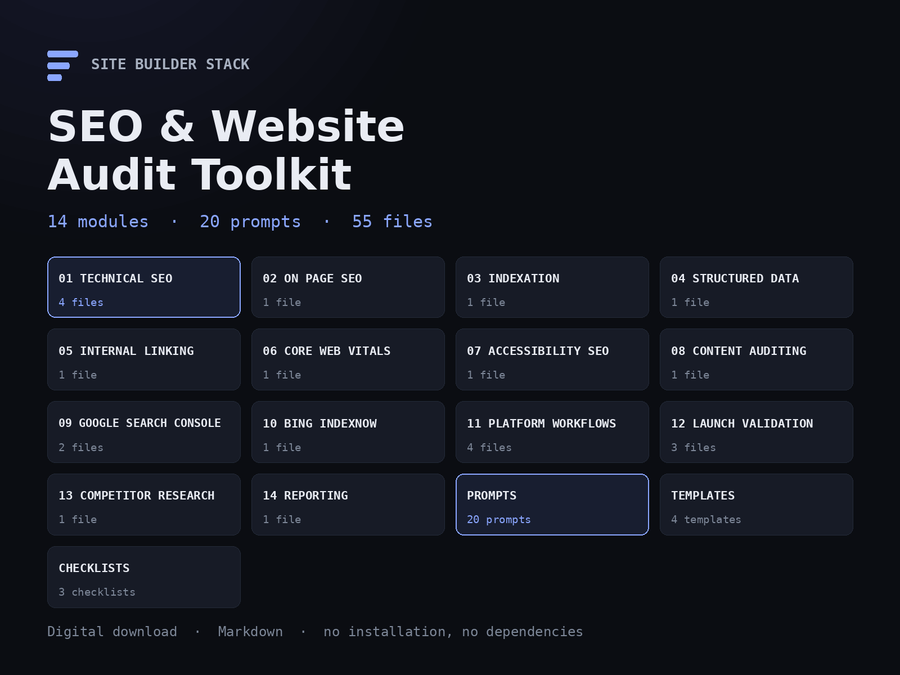
Fourteen modules, twenty prompts, four report templates and three checklists — 26,000 words of plain Markdown. Nothing to install, no account, no subscription.
| Module | Covers |
|---|---|
01-technical-seo |
Crawlability, indexability, robots, sitemaps, canonicals, redirects, status codes, pagination |
02-on-page-seo |
Titles, descriptions, heading hierarchy, alt text, content structure, duplicate metadata |
03-indexation |
Why pages are not indexed, and what actually helps |
04-structured-data |
Schema that describes what is visibly on the page, by page type |
05-internal-linking |
Orphan pages, crawl distance, anchor text, cluster-to-hub structure |
06-core-web-vitals |
LCP, INP and CLS diagnosed one variable at a time |
07-accessibility-seo |
The overlap, with the two halves reported separately |
08-content-auditing |
Decay, thin content, intent mismatch, cannibalisation, consolidation |
09-google-search-console |
Coverage, URL inspection, performance analysis, and the API's traps |
10-bing-indexnow |
Bing Webmaster Tools and IndexNow, including what submission does not do |
11-platform-workflows |
Shopify, WordPress, Astro, static sites, custom applications |
12-launch-validation |
Pre-launch, post-launch and migration |
13-competitor-research |
Ethical research from public information |
14-reporting |
Executive summary, technical findings, remediation backlog, severity matrix |
The prompt library
Twenty prompts, each with a stated role, objective, discovery phase, constraints, evidence requirements, analysis, implementation, validation and deliverables. They are the part you will use most.
- Complete website SEO audit
- Technical SEO audit
- Shopify, WordPress and Astro SEO audits
- Search Console analysis, and Bing / IndexNow
- Indexation troubleshooting
- Sitemap, robots and canonical audits
- Internal link audit
- Structured data audit
- Core Web Vitals audit
- Accessibility and SEO overlap
- Content gap and content decay audits
- Competitor research
- Launch and migration SEO audits
They are not variations on one another. Each addresses a genuinely different question and carries the platform-specific facts that make an audit right or wrong — that a Shopify sitemap cannot be hand-edited, that a WordPress SEO plugin owns canonicals, that an Astro site with no site in its config silently emits relative canonicals.
What using it looks like
- Open
START-HERE.md. It routes you to one file based on your situation. - Open that prompt, replace the bracketed values, and hand it to Claude Code.
- It runs a discovery phase and changes nothing. You approve what it found.
- It produces findings with evidence — the URL, the response, the exact markup.
- You fix things, in a separate session, with the validation command it gave you.
- You break each check deliberately and confirm it goes red before trusting it.
Supported platforms
Shopify, WordPress, Astro, static sites and custom applications each have their own workflow, because the things that go wrong differ. The general modules apply everywhere.
How the three products differ
| SEO & Website Audit | Conversion & Revenue | Website Launch System | |
|---|---|---|---|
| Price | $19.99 | $19.99 | $19.99 |
| Best for | A site that is not ranking | Traffic that under-converts | A site you are building |
| Technical SEO | Complete | Not covered | Included |
| Search Console and Bing | Complete | Not covered | Summary level |
| Content auditing for search | Complete | Not covered | Not covered |
| Competitor research | Included | Not covered | Not covered |
| Conversion auditing | Not covered | Primary | One landing-page workflow |
| Funnels and drop-off analysis | Not covered | Complete | Not covered |
| Experimentation | Not covered | Complete | Not covered |
| Analytics and measurement | Search data only | Complete | Setup level |
| Conversion copy | Not covered | Complete | Not covered |
| Reporting templates | Included | Included | Not covered |
| Accessibility | SEO overlap only | Conversion path only | Complete |
| Performance | Core Web Vitals in full | Conversion effect only | Included |
| Planning and architecture | Not covered | Not covered | Complete |
| Platform build prompts | SEO workflows only | Not covered | Full build systems |
| Security audits | Not covered | Not covered | Complete |
| Git, CI/CD, deployment | Not covered | Not covered | Complete |
All three are also sold together as the Complete Site Builder Stack, at less than buying them separately. Both figures are shown on that page. There is also a fourth product for the stage after launch: the Website Operations & Maintenance System covers monitoring, security, backups, updates, deploys and incidents, and is sold on its own. If only one column above describes your problem, buy that one — there is no advantage to owning a system you are not going to open.
They sit end to end: the Launch System builds the site, this toolkit gets it found, and the Conversion & Revenue Optimization Toolkit turns the traffic into outcomes. They overlap deliberately in two narrow places — the SEO material, where this one goes considerably deeper, and landing-page conversion, where the conversion toolkit does.
Buying one does not include the others, and there is no automatic upgrade credit. If you want more than one, buy more than one.
Delivery and licence
A single ZIP, delivered by download immediately after purchase. 55 files, 88 KB, all plain Markdown — nothing to install and nothing that expires. A published SHA-256 checksum accompanies the download so you can verify what you received.
Licensed to one person for unlimited projects, including client work. You may not redistribute or resell it. Full terms are in LICENSE.md inside the archive.
What it does not do
It does not access Search Console, Bing or any analytics platform on your behalf — Claude Code has no credentials for your properties and cannot get them. Where a workflow needs that data, it tells you exactly what to export.
It does not promise a ranking. Nobody can. And where the honest conclusion about a site is that the constraint is authority rather than optimisation, these prompts are written to say so rather than supply a list of small changes that would not move anything.
Inside the SEO & Website Audit Toolkit
No video is published yet. Below is the same walkthrough it will narrate, in a form that works today.
-
What lands in your inbox
One ZIP. Fourteen numbered modules, twenty prompts, four report templates and three checklists, plus a START-HERE that tells you which file to open. All plain Markdown — nothing to install, no account, no subscription.
claude-code-seo-website-audit-toolkit/ START-HERE.md 01-technical-seo/ 02-on-page-seo/ ... 14-reporting/ prompts/ templates/ checklists/ -
START-HERE routes you in four minutes
It does not explain SEO. It asks what your situation is and sends you to one file. The table is the whole page.
| Your situation | Open this | | Pages are not being indexed | 03-indexation/INDEXATION-TROUBLESHOOTING | | About to launch | 12-launch-validation/PRE-LAUNCH-SEO | | Traffic dropped after migrating | 12-launch-validation/MIGRATION-SEO | -
Open the prompt, fill in the brackets
Every prompt names its role, objective, discovery phase, constraints, evidence requirements, analysis, validation and deliverables. Replacing the bracketed values is the difference between a scoped audit and a generic one.
You are a technical SEO specialist auditing [SITE], a [SITE TYPE] built on [PLATFORM]. I own the codebase. -
Discovery runs first and changes nothing
The agent reports the structure, fetches one URL of every type, and states what it cannot determine without data you have not given it. Then it stops and waits.
Stop and show me this before continuing. -
Findings come with evidence, not summaries
Every finding carries the URL, the response and the exact markup. The prompt forbids fixing anything in the same run — an audit whose findings disappear into a commit leaves you a diff and no report.
- Do not change anything in this run. - Every finding needs evidence: the URL, the response, the exact markup. -
Platform workflows carry what actually differs
A Shopify sitemap cannot be hand-edited. A WordPress SEO plugin owns canonicals. An Astro site with no `site` in its config emits relative canonicals silently. Audits that do not know these produce confident wrong answers.
11-platform-workflows/ SHOPIFY.md WORDPRESS.md ASTRO.md STATIC-AND-CUSTOM.md -
Every check gets proved capable of failing
Break the thing, watch the check go red, restore it, watch it go quiet. Both directions. This is the rule the whole toolkit is built on, because a check nobody has seen fail is a line in a log that says PASS.
# add a noindexed URL to the sitemap copy # run the checker -> must report a failure # remove it -> must go quiet -
Hand someone the report
Four templates: executive summary, technical findings, remediation backlog, and before-and-after. Each has an unmeasured section, because a report that hides its gaps reads as more complete and is less useful.
14-reporting/
templates/EXECUTIVE-SUMMARY.md
templates/TECHNICAL-FINDINGS.md
templates/REMEDIATION-BACKLOG.md
templates/BEFORE-AFTER.md
The recorded walkthrough is not published yet. Rather than put a play button over a still image, the steps above are the same tour in writing — the real folder names, the real entry point, and the real thirteen-stage workflow.
For the system applied to a real build, read how this store was built with it.
Before you buy
No, and they overlap in one place on purpose. This toolkit is about auditing and search on a site that already exists. The Launch System is about planning, building and launching one — it includes SEO but does not go as deep, and it also covers security, accessibility, Git and deployment, which this does not.
No. It has no credentials for your property and there is no way to give it any that does not go through you. The workflows here tell you exactly what to export and hand over, or how to set up a service account yourself if you will do it repeatedly. Anything claiming otherwise is wrong.
Nobody can promise that and this does not. It finds and fixes defects that can be observed. Where the honest conclusion is that a site's constraint is authority rather than optimisation, these prompts are written to say so — which is more useful than a list of small changes that would not move anything.
No. It assumes you can read a diff, run a command and reach your live site. Most of it is aimed at a competent developer who has inherited responsibility for how a site performs in search.
Shopify, WordPress, Astro, static sites and custom applications each have their own workflow, because what goes wrong differs. Everything else applies to any platform.
One ZIP: 55 files, 88 KB, all plain Markdown. Twenty prompts, fourteen modules, four report templates and three checklists. Nothing to install, no account, no subscription, and a published SHA-256 so you can verify the download.
No. There is no automatic upgrade credit and we are not going to promise one the store cannot honour. If you want both products, buy both.
Yes, on unlimited client projects. The licence is per person, so buy a copy for each person who will use it. You may not redistribute or resell the toolkit itself.
Search is one part of the problem
Getting found, getting acted on, and staying up are different jobs. This toolkit covers the first. Building the site, converting the traffic and operating it are the other three — or take the first three together.
-
Build & launch
The Claude Code Website Launch System
Planning, platform build systems, a production CLAUDE.md, security, accessibility, Git, deployment and launch checklists. The whole lifecycle.
$19.99 The flagship
-
Convert & grow
Claude Code Conversion & Revenue Optimization Toolkit
Once the traffic arrives: funnels, page audits, forms, analytics, experimentation and conversion copy. No overlap with the search material here.
$19.99
-
Operate & maintain
Claude Code Website Operations & Maintenance System
Monitoring, security checks, backups, dependency updates, deployment gates, incident playbooks and monthly reporting. For the stage after launch, which lasts longest.
$39.99
-
Migrate
Claude Code Website Migration & Replatforming System
Inventory every URL, map it, generate and test the redirects, compare metadata and structured data page by page, record DNS before it is touched, and get a GO / GO WITH WARNINGS / NO-GO from evidence. For the weeks a site is moving.
$29.99
-
The first three
Complete Site Builder Stack
Build, rank and convert in one purchase — the three earlier systems on this site, delivered as three downloads.
$39.99
-
Deliver
Claude Code Agency & Client Delivery System
Discover, scope, propose, onboard, build, review, launch, hand off and retain website clients — the engagement around the technical work, as commands that read one set of files per client. For freelancers and agencies.
$39.99
Separate products at separate prices, or the first three together as the Complete Site Builder Stack. Buying one does not include the others and there is no upgrade credit. Which stage you are in is explained on the Build, Rank, Convert, Operate page.
Building a site rather than auditing one?
The Claude Code Website Launch System covers the whole lifecycle — planning, platform build systems, security, accessibility, Git and CI/CD, deployment and launch checklists.
A separate product. Buying the toolkit does not include it, and there is no automatic upgrade credit.